🚀 Quick Verdict
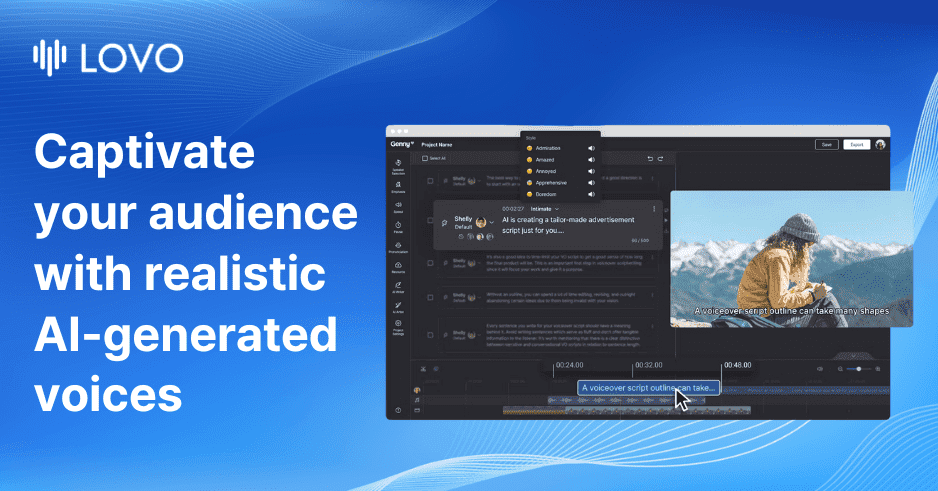
The emotional range of the Pro V2 voices is the most human-like we’ve heard this year. It handles sarcasm and urgency without the usual robotic drone. The timeline editor feels a bit cramped on a laptop screen though.
| Overall Score | 8.2/10 |
| Best For | Marketing and explainer videos |
| Tested Plan | Free Trial |
| Testing Period | 3 days |
| Biggest Strength | Emotional variety in speech |
| Biggest Weakness | Cluttered timeline interface |
| Best Alternative | ElevenLabs |
🤔 What Is Lovo?
Lovo is an AI voice platform designed for founders who need high-quality audio for marketing videos. It combines a text to speech engine with a full video timeline editor. You can generate a script, turn it into audio, and add stock footage in one window.
The company launched in 2019 and has evolved from a simple voice library into a tool called Genny. It solves the problem of hiring expensive voice talent for every small social media update or product demo. It currently supports over 100 languages and 500 distinct voices.
⚙️ How We Tested Lovo
We signed up for the Free Trial to test the full Genny interface over 3 days. Our team completed three specific tasks: generating a 2-minute marketing script using the AI writer, applying “Sarcastic” and “Urgent” emotional styles to a product demo, and syncing a generated voice track with stock images in the timeline.
✨ Key Features (What Actually Stood Out)
Lovo tries to be a one-stop shop for content creation by bundling scripting and editing tools. Here is what worked during our testing.
- Genny Editor — This is a multi-track timeline that lets you layer audio, video, and subtitles. It felt familiar to anyone who has used basic video software but it’s built specifically for voice-first projects.
- Pro V2 Voices — These are directable voices where you can add tags like [laughing] or [sarcastic] before the text. We found they followed these instructions much better than standard AI models.
- AI Writer — It generated a decent first draft for a product explainer script. It isn’t a replacement for a copywriter, but it stops the blank page problem.
- Voice Cloning — We uploaded a one-minute clip of a team member’s voice. The clone was ready in about 10 minutes and captured the basic tone, though it missed some unique inflections.
- AI Art Generator — You can create images for your video backgrounds directly in the app. It’s a nice addition that saves time searching for stock photos.
💰 Lovo Pricing — Is It Worth It?
Lovo offers a free trial so you can test the voices before paying. Most high-end features like voice cloning and the Pro V2 voices are locked behind their paid tiers. If you make more than two videos a month for youtube or social media, the time saved on recording usually justifies the cost.
| Plan | Price | Best For | Watch Out For |
| Free Trial | 0 | Testing features | No commercial rights |
| Paid Plans | Varies | Business use | Credit limits apply |
Our pick: Paid Plans — You need these for commercial rights and the high-quality Pro V2 voices that make the tool worth using.
🧪 What We Found During Testing
The setup was fast and we were in the editor within two minutes. We were surprised by the “Admiration” emotion tag which added a soft, genuine quality to a testimonial script. It didn’t sound like a GPS voice at all.
However, the timeline editor can get messy. When we had more than five audio blocks, it became hard to manage the timing without a lot of zooming in and out. The lip-syncing for video is also a manual process which takes some patience.
A founder in our community who runs a small agency told us the Narrative voice saved them from recording late at night when their voice was tired.
⚠️ Limitations We Found
- Timeline Learning Curve — The interface has a lot of buttons and sidebars. It can feel overwhelming if you just want a simple audio file.
- Voice Cloning Wait Times — As of May 2025, some complex voice models can take a few hours to train if the server load is high.
- Audio Artifacts — Occasionally, the Pro V2 voices would add a strange breathy sound at the end of sentences that required a regeneration.
⚔️ Lovo vs Competitors
Lovo competes with several heavy hitters in the AI audio space. It stands out by offering a full video editor alongside the voice tools.
| Competitor | Pick it instead of Lovo if… |
| ElevenLabs | You only need the highest quality audio and don’t need a video editor. |
| Murf AI | You want a simpler, cleaner interface for corporate presentations. |
| PlayHT | You need a massive library of voices for blog-to-speech conversion. |
👍 Pros & Cons
| ✅ Pros | ❌ Cons |
| Excellent emotional range in voices | Editor UI feels cluttered |
| All-in-one script and video tools | Voice cloning isn’t instant | Free version has limited features |
| Good team collaboration features | Occasional audio glitches |
🎯 Who Should Use Lovo (And Who Shouldn’t)
✅ Use it if you:
- Are a founder making regular explainer videos for your product.
- Need consistent branding across different languages.
- Want to generate scripts and audio in the same workspace.
❌ Skip it if you:
- Want a one-click video solution. Try HeyGen instead.
- Prefer a minimalist audio-only tool. Check out ElevenLabs.
- Are on a very tight budget and don’t mind robotic voices.
❓ Frequently Asked Questions
Is Lovo AI free to use?
There is a free trial available that lets you test the voices and editor, but you’ll need a paid plan for commercial use and downloads.
Can I use Lovo voices for YouTube?
Yes, if you have a paid subscription, you own the rights to the audio for YouTube and other social platforms.
How good is the voice cloning?
It is very accurate for general tone with just a one-minute sample, but it may struggle with very specific accents or emotional shifts.
What is the difference with Pro V2 voices?
Pro V2 voices are “directable,” meaning you can tell the AI exactly how to speak using tags like [laughing] or [whispering].
Does Lovo support multiple languages?
Yes, it supports over 100 languages including Spanish, French, German, and several regional dialects.
Can I collaborate with my team?
Lovo has a team feature that allows multiple users to work on the same project workspace without exporting files.
Looking for more tools like this? See all content-creation tools we’ve reviewed →
Discover more from AI Founder Kit
Subscribe to get the latest posts sent to your email.