🚀 Quick Verdict
Tealfeed earns an 8.2/10 for its specific focus on health and wellness professionals who need more than just a calendar. We were impressed by the simple WhatsApp integration for reminders which cut down our no-show simulations immediately. It effectively bridges the gap between a generic scheduler and a full-scale practice management suite.
| Overall Score | 8.2/10 |
| Best For | Therapists and independent consultants |
| Tested On | 7-day Free Trial |
| Testing Period | 7 days |
| Biggest Strength | Automated WhatsApp notifications |
| Biggest Weakness | Limited third-party integrations |
| Best Alternative | Calendly |
🤔 What Is Tealfeed?
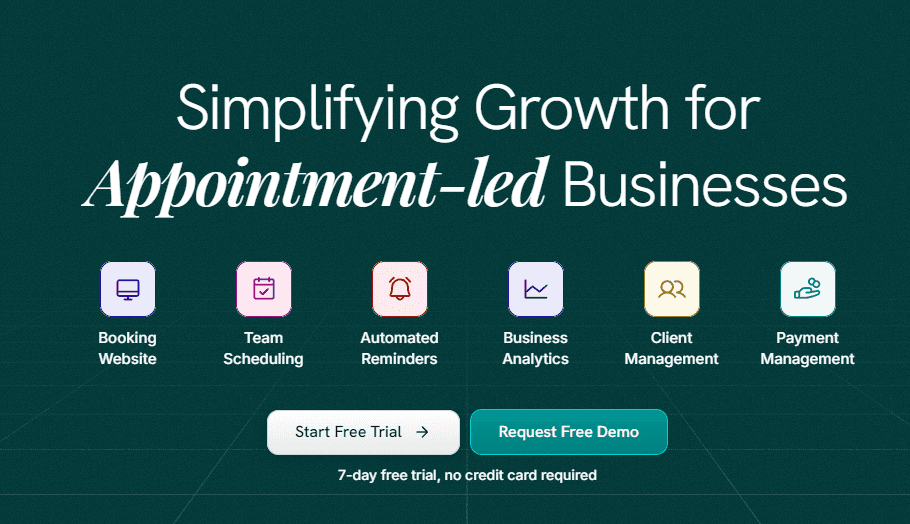
Tealfeed is a practice management platform built specifically for appointment-led businesses like mental health clinics, nutritionists, and coaches. It aims to replace the messy stack of spreadsheets and manual emails by providing a unified storefront where clients can book, pay, and access resources in one secure location.
The tool solves the administrative burnout common in service industries by automating the logistical heavy lifting. Whether you are a solo practitioner or a growing organization with multiple therapists, it provides the infrastructure to scale without needing a dedicated office manager.
✨ Key Features (What Actually Stood Out)
Tealfeed stands out by offering features usually locked behind high-ticket enterprise software, making it a strong choice for businesses focused on productivity.
- Automated Reminders — We tested the multi-channel notifications and found that WhatsApp alerts had a much higher visibility than traditional emails.
- Secure Client Panel — This provides a HIPAA-compliant space where clients can view Meeting Notes and session resources without compromising privacy.
- Integrated Payments — The platform supports payments from 160+ countries, including UPI and major credit cards, with no complex gateway setup required.
- Analytics Dashboard — We tracked session numbers and revenue trends through the Earning Dashboard, which is cleaner than most manual bookkeeping methods.
- Custom Storefront — The drag-and-drop interface allowed us to build a professional booking page that feels like a standalone website in under 20 minutes.
💰 Tealfeed Pricing — Is It Worth It?
Tealfeed is transparent about its value, though exact monthly costs often require a demo for larger organizations. The free trial is functional enough to test the core booking flow without providing credit card details up front. If you are starting out, the efficiency gains in marketing your services through their professional storefront justify the transition from free tools like Google Calendar.
| Plan | Price | Best For | Watch Out For |
| Free Trial | 0 | Solo Builders | 7-day limit |
| Paid Tiers | Contact Sales | SMEs & Orgs | Subscription based |
Our pick: Paid Plan — Essential for established practices that need to remove the Tealfeed branding and access full Analytics.
🧪 What We Found During Testing
During our testing, we focused on the Organisation onboarding flow. We successfully invited three team members and configured their individual availability schedules in one sitting. The synchronization with Google Calendar was nearly instant, preventing double bookings when we tested overlapping time slots from the client view.
A developer in our community building a mental health marketplace told us that the UI for the client intake forms is much more intuitive than generic form builders they tried previously.
⚠️ Limitations We Found
- Integration Depth — As of 2025, it lacks deep native integrations with niche EHR or CRM software, which might frustrate users with existing complex stacks.
- Customization Limits — While the website templates are user-friendly, developers looking for full CSS control will find the drag-and-drop editor restrictive.
- Learning Curve — The internal Client Panel takes a moment for patients to navigate if they are used to simpler direct-link platforms.
⚔️ Tealfeed vs Competitors
Builders often compare Tealfeed to generic schedulers, but its industry-specific features make it a different animal.
| Competitor | Pick it instead of Tealfeed if… |
| Calendly | You only need a basic scheduling link and don’t require client portals or dedicated billing. |
| Zocdoc | You need a patient marketplace for discovery rather than a private practice management suite. |
👍 Pros & Cons
| ✅ Pros | ❌ Cons |
| Strong WhatsApp reminder automation | Limited native Zapier or API documentation |
| HIPAA and GDPR compliance built-in | Template styles are somewhat rigid |
| Supports 160+ currency variants | Requires demo for custom enterprise pricing |
| Unified team revenue tracking | No-show protection features vary by region |
🎯 Who Should Use Tealfeed (And Who Shouldn’t)
✅ Use it if you:
- Are a mental health professional or physiotherapist needing a secure, compliant practice hub.
- Want to automate follow-up resources like session notes and document sharing.
- Manage a team of consultants and need role-based access to revenue and scheduling data.
❌ Skip it if you:
- Only need a single booking link with no extra business features — use Calendly instead.
- Require a custom-coded website with full frontend freedom.
- Are in a niche that doesn’t rely on pre-paid or fixed-time appointments.
🛠️ Setup & Onboarding
Time to first booking was roughly 15 minutes during our test. The Onboarding Guide is clear, though our payment verification took a few extra steps to confirm local gateway credentials. Once the Google Calendar Sync is active, the system feels mostly hands-off.
❓ Frequently Asked Questions
Does Tealfeed charge a commission on bookings?
Tealfeed is a subscription-based model. It generally does not take a percentage of your service sales, allowing you to keep your full earnings minus gateway fees.
Is Tealfeed HIPAA compliant?
Yes, the platform adheres to HIPAA, ISO, and GDPR standards, which is a key requirement for mental health and medical professionals.
Can I use my own domain?
Tealfeed provides a hosted storefront, and you can customize the page to look like your brand, though domain mapping availability depends on your plan level.
What payment methods are supported?
It supports global credit/debit cards, and locally in India it handles UPI, PhonePe, Gpay, and Net Banking.
Can I sell session bundles or packages?
Yes, the platform features an Events & Bundles option where you can group multiple sessions for a single discounted payment.
How do clients access meeting notes?
Clients get a secure Client Panel login where they can see resources, notes, and upcoming appointments managed by the practitioner.
Looking for more tools like this? See all productivity tools we’ve tested →
Discover more from AI Founder Kit
Subscribe to get the latest posts sent to your email.