🚀 Quick Verdict
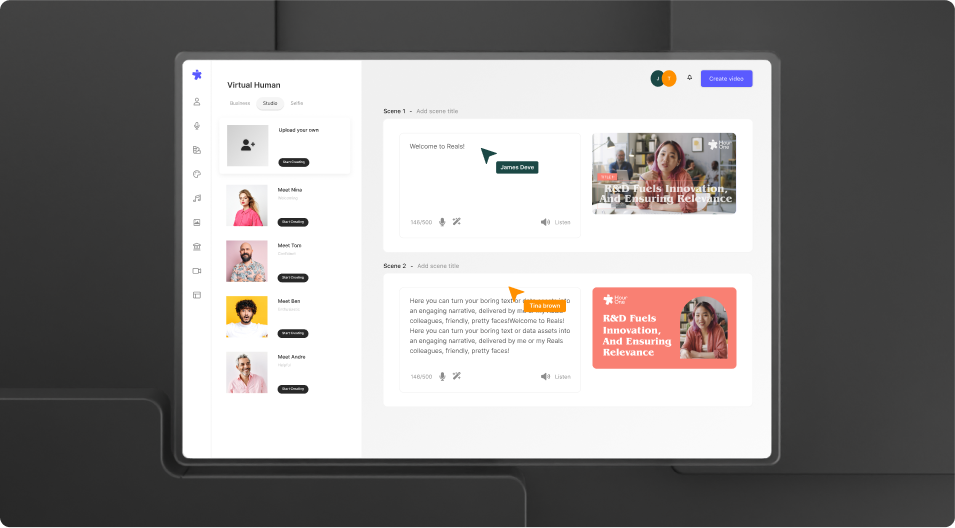
The lip-sync is surprisingly tight on shorter sentences. We noticed the rendering speed is much faster than traditional editing tools. It’s a solid choice for teams needing quick explainers without a camera crew.
| Overall Score | 8.2/10 |
| Best For | Internal training teams |
| Tested Plan | Free Trial |
| Testing Period | 3 days |
| Biggest Strength | Fast rendering times |
| Biggest Weakness | High credit consumption |
| Best Alternative | HeyGen |
🤔 What Is Hour One?
Hour One is a platform that turns text scripts into videos featuring human-like avatars. It was built to help businesses create training and marketing content at a high volume without hiring actors or renting studios. Wix recently acquired the company to add these video capabilities to their website builder.
The tool uses virtual twins of real people to deliver your message. You simply pick an avatar, type your script, and the system generates a video where the character speaks your words. It solves the problem of expensive video production for companies that need frequent updates.
⚙️ How We Tested Hour One
We used the Free Trial plan over a period of 3 days. Our team completed 3 specific tasks: creating a 60-second product demo, testing the Spanish translation feature, and using a custom background for a training clip. We focused on how easy it was for a non-editor to get a finished file.
✨ Key Features (What Actually Stood Out)
The platform focuses on making content creation faster by removing the need for physical filming. Here is what we found during our test runs.
- Virtual Twins — These are digital versions of real humans. We found the facial expressions stayed consistent even when the script included technical jargon.
- Video Templates — Pre-made layouts for news or training. These helped us skip the design phase entirely by providing ready-to-use compositions.
- Multi-language Support — Translating content into different voices. The Spanish voiceover matched the lip movements well on short sentences.
- Text-to-Video — Generating scenes from a raw script. It automatically placed the avatar in a scene based on the text we provided.
- Brand Customization — Adding logos and colors to the player. This made the final video feel like it belonged to our company rather than a generic template.
💰 Hour One Pricing — Is It Worth It?
Hour One uses a credit-based system which can be expensive if you make many mistakes. You should plan your scripts carefully before hitting render. Check out other youtube style tools to compare credit costs. Most advanced features are locked behind their paid tiers.
| Plan | Price | Best For | Watch Out For |
| Free Trial | $0 | Testing features | Large watermarks |
| Lite | Contact Sales | Small projects | Limited credits |
| Pro | Contact Sales | Mass production | High monthly cost |
Our pick: Free Trial — It’s the only way to see if the avatar movements meet your quality standards before spending money.
🧪 What We Found During Testing
The interface is clean and didn’t require a manual to understand. We were able to get our first draft rendered in under ten minutes. The avatars look great from the chest up, but they can look a bit stiff if the script is very long. We liked how the system handled different accents without sounding too robotic.
A founder in our community who runs a VR agency told us their prompting language didn’t always read like they thought, requiring specific phrases like flying dot to get a simple line effect.
⚠️ Limitations We Found
- Credit Consumption — As of early 2024, fast hours disappear quickly when you are testing different takes.
- Avatar Rigidity — The characters can look a bit unnatural when they aren’t actively speaking.
- Acquisition Uncertainty — Since Wix bought them, some standalone features might change or move into the Wix ecosystem.
⚔️ Hour One vs Competitors
There are a few big names in the synthetic video space that offer similar features.
| Competitor | Pick it instead of Hour One if… |
| HeyGen | You need more realistic hand gestures and body language. |
| Synthesia | You want a larger library of stock avatars for corporate training. |
| Elai | You need a lower price point for basic slide-to-video conversions. |
👍 Pros & Cons
| ✅ Pros | ❌ Cons |
| Fast rendering speeds | High credit costs |
| Good lip-sync quality | Limited free tier |
| Clean user interface | Occasional robotic movement |
| Multiple language options | Watermarks on free version |
🎯 Who Should Use Hour One (And Who Shouldn’t)
✅ Use it if you:
- Need to create internal HR or safety training videos quickly.
- Are already using Wix and want a tight integration for your site.
- Want to translate your video content into several languages.
❌ Skip it if you:
- Need high-energy marketing clips with lots of movement. Link to HeyGen instead.
- Are on a very tight budget for video credits.
- Require complex video editing features inside the tool.
❓ Frequently Asked Questions
Is Hour One free?
It offers a free trial so you can test the avatars, but you will need a paid plan to remove watermarks.
How does Hour One compare to HeyGen?
Hour One is often faster at rendering, while HeyGen typically offers more realistic body movements.
Can I use my own voice?
Yes, you can upload your own audio files or use the built-in text-to-speech engine.
Is there a watermark on videos?
Videos created on the free trial plan include a visible Hour One watermark.
Who owns Hour One?
Hour One was acquired by Wix in 2024 to enhance their AI media tools.
Is it good for YouTube?
It works well for faceless news channels or educational content where a talking head is needed.
Looking for more tools like this? See all content-creation tools we’ve reviewed →
Discover more from AI Founder Kit
Subscribe to get the latest posts sent to your email.