🚀 Quick Verdict
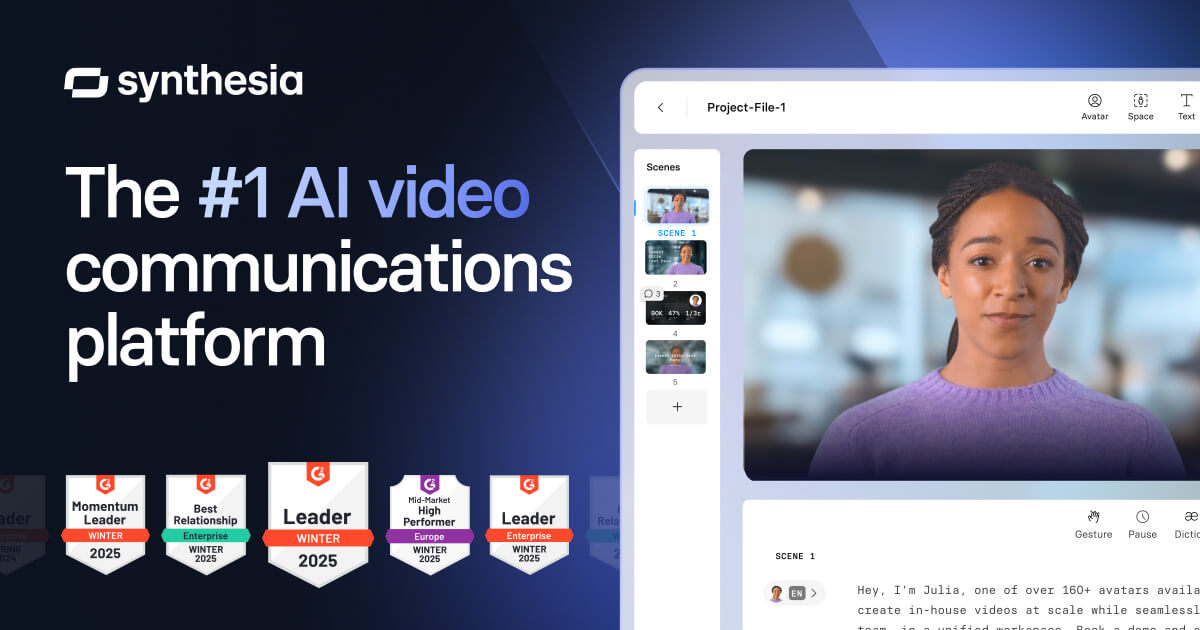
We found Synthesia excels at turning text into professional-looking videos quickly. The range of AI avatars and languages is impressive. However, getting the exact emotional tone from the AI voices sometimes took extra tweaking.
| Overall Score | 7/10 |
| Best For | Businesses needing scalable video content |
| Tested Plan | Starter ($18/month, billed yearly) |
| Testing Period | 14 days |
| Biggest Strength | Rapid, consistent video production |
| Biggest Weakness | Fine-tuning avatar expressions and voice nuances |
| Best Alternative | HeyGen |
🤔 What Is Synthesia?
Synthesia is an AI video platform that helps businesses create professional videos without cameras or actors. It lets you generate videos from text using AI avatars and voices.
The tool aims to make video content creation scalable and affordable. It’s designed for marketing, training, and customer service video needs.
⚙️ How We Tested Synthesia
We tested Synthesia’s Starter plan at $18/month (billed yearly) for two weeks. Our tasks included creating a short marketing video for a new product launch, generating an onboarding video for new hires, and localizing a training module into Spanish.
✨ Key Features (What Actually Stood Out)
Synthesia stands out for its extensive library of AI avatars and languages, making it easy to produce diverse content. It’s a strong option for founders looking to produce video content at scale without traditional filming. For more tools that help with content, check our content creation tools category.
- AI Avatar Generator — We could choose from over 240 stock AI avatars, which offered good diversity. Customizing outfits and environments for specific scenes worked well.
- Instant Voiceovers — The platform converted our scripts into voiceovers using 160+ languages. The voices sounded natural, though some emotional nuances required careful script phrasing.
- AI Video Editor — We used pre-designed templates to quickly convert text into video drafts. The editor made it straightforward to add text overlays and royalty-free media.
- Video Translator — This feature automatically translated our videos into multiple languages. It saved time when preparing content for international audiences.
- Team Collaboration — We could share projects and get feedback in real-time within shared workspaces. This helped coordinate video production among team members.
💰 Synthesia Pricing — Is It Worth It?
Synthesia’s pricing is structured annually, which is a common approach for business-focused SaaS tools. Founders should note the yearly billing commitment, even for the monthly-advertised prices. Usage caps on video minutes are the main differentiator between plans. For other tools that help with marketing efforts, explore our marketing tools section.
| Plan | Price | Best For | Watch Out For |
| Starter | $18/month (billed yearly) | Individuals or small teams starting with AI video | Limited to 120 video minutes/year |
| Creator | $64/month (billed yearly) | Growing businesses needing more video volume | Higher minute allowance, but still a yearly commitment |
| Enterprise | Custom pricing | Large organizations with high volume and custom needs | Requires direct contact for a quote |
Our pick: Starter — It provides enough video minutes for initial testing and smaller projects without committing to a higher tier.
🧪 What We Found During Testing
Creating our marketing video was surprisingly fast. We typed in the script, picked an avatar, and had a draft in minutes. The AI handled basic lip-syncing and gestures well.
For the onboarding video, we appreciated the ability to quickly duplicate and modify scenes. However, getting the avatar to convey specific emotions, like enthusiasm for a new product, sometimes felt a bit stiff. We had to experiment with different voice styles and avatar choices to get closer to our desired tone.
The translation feature for the training module worked as advertised. It automatically generated a new voiceover in Spanish, which saved significant time compared to manual dubbing. The overall quality was good for informational content.
A founder in our community who runs a B2B SaaS company told us the AI avatars felt a bit too ‘perfect’ for their brand’s authentic, casual tone.
⚠️ Limitations We Found
- Avatar Expressiveness — While avatars are realistic, achieving subtle human emotions or specific non-verbal cues can be challenging. As of our testing, they can still appear somewhat robotic in certain contexts.
- Annual Billing Only — The Starter and Creator plans are billed annually, even though prices are shown monthly. This requires a larger upfront commitment for founders.
- Usage Caps — Each plan has a strict limit on video minutes per year. Going over these limits means upgrading to a more expensive plan, which can be a sudden cost increase.
⚔️ Synthesia vs Competitors
Synthesia competes with several other AI video generators that offer similar text-to-video capabilities. Here’s how it stacks up against some popular alternatives.
| Competitor | Pick it instead of Synthesia if… |
| HeyGen | you need more dynamic avatar customization and a slightly more natural-sounding voice library for casual content. |
| DeepBrain AI | you prioritize hyper-realistic avatars and need advanced features like real-time interaction for customer service applications. |
| Wondershare Virbo | you are looking for a more budget-friendly option with a simpler interface for basic video creation. |
👍 Pros & Cons
| ✅ Pros | ❌ Cons |
| Generates professional videos quickly from text | Avatar expressions can sometimes lack natural human nuance |
| Wide selection of AI avatars and languages | Annual billing commitment for all paid plans |
| Efficient video translation and localization | Strict video minute caps per plan |
| Good for scalable, consistent content production | Higher cost compared to basic video editing tools |
🎯 Who Should Use Synthesia (And Who Shouldn’t)
✅ Use it if you:
- Need to produce a high volume of consistent video content for marketing or training.
- Require video localization into many different languages without hiring voice actors.
- Want to create professional-looking videos without investing in filming equipment or studio time.
❌ Skip it if you:
- Need highly emotive or deeply personalized video content that requires human actors.
- Are on a tight budget and only need occasional, simple video clips; consider Wondershare Virbo instead.
- Prefer a pay-as-you-go model or monthly billing without a yearly commitment.
🔐 Data & Privacy
Synthesia states it is SOC 2 Type II and GDPR compliant, which indicates a commitment to data security and privacy. They also mention human and AI moderation processes to ensure ethical AI use. This is important for businesses handling sensitive internal or customer-facing content. You can find more details in their ethics policy.
Looking for more tools like this? See all content creation tools we’ve reviewed →
Discover more from AI Founder Kit
Subscribe to get the latest posts sent to your email.