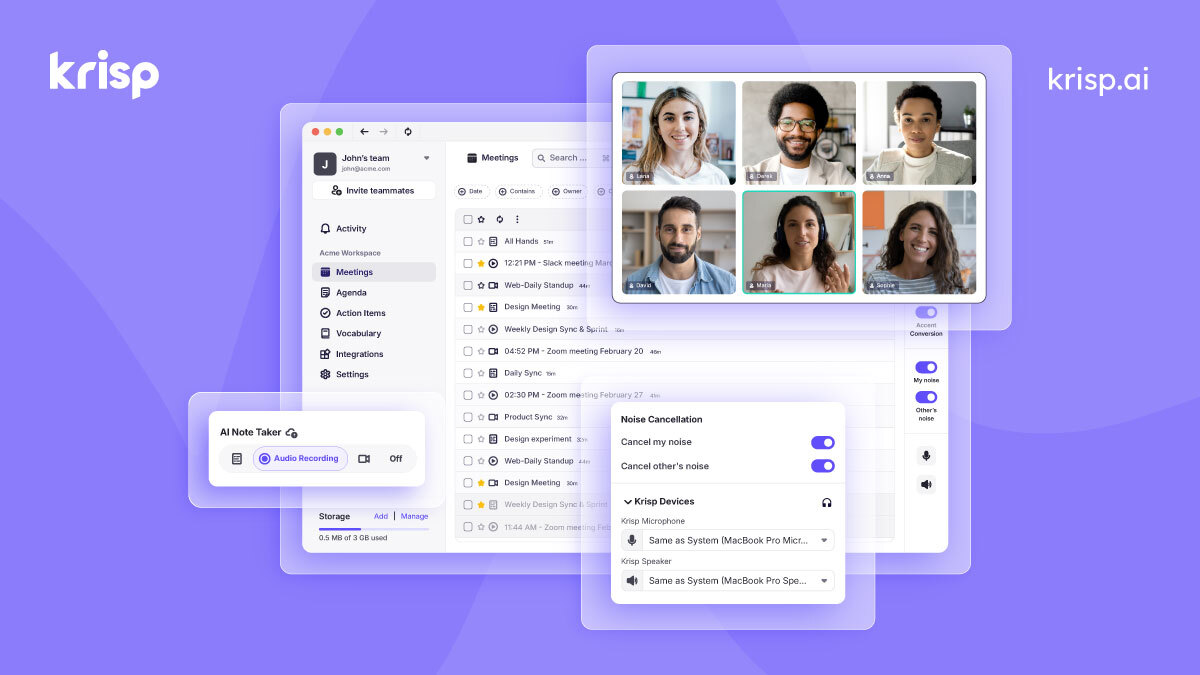
🚀 Quick Verdict
The noise cancellation is the most effective we’ve tested, silencing a loud vacuum cleaner in the same room without clipping the speaker’s voice. It runs locally on your computer, so there’s no lag or audio delay during live calls. We found the bot-free transcription much less distracting than competitors that join meetings as a visible participant.
| Overall Score | 9.2/10 |
| Best For | Remote founders in noisy environments |
| Tested Plan | Pro Plan at $12/month |
| Testing Period | 14 days |
| Biggest Strength | On-device noise removal |
| Biggest Weakness | High CPU usage on older laptops |
| Best Alternative | Otter AI |
🤔 What Is Krisp AI?
Krisp is a desktop application that acts as a virtual layer between your microphone and your communication apps. It uses Voice AI to filter out everything that isn’t a human voice, including sirens, fans, and keyboard clicks. It was built to solve the problem of unprofessional background noise for remote workers and call centers.
Beyond audio cleaning, it now functions as a full meeting assistant. It records and transcribes calls across any platform like Zoom, Teams, or Slack Huddles. Because it captures audio directly from your system, it doesn’t need to invite a bot to the call to work.
⚙️ How We Tested Krisp AI
We signed up for the Pro plan at $12 per month and used it for 14 days on a MacBook Pro. We completed three specific tasks: filtering out loud cafe chatter during a 30-minute investor pitch, transcribing a 45-minute technical strategy briefing, and using the AI Meeting Assistant to generate action items for a Slack update.
✨ Key Features (What Actually Stood Out)
Krisp differs from other tools by focusing on the physical audio environment rather than just the text. You can find more ways to improve your workflow in our productivity category.
- Bi-directional Noise Cancellation — This removes noise from your end and also cleans up the audio coming from other participants. We found it helpful when a client was calling from a windy outdoor location.
- Bot-free Transcription — It records the meeting without a visible bot joining the participant list. This avoids the awkwardness of asking for permission or explaining why a bot is in a private room.
- AI Meeting Notes — The summaries are structured into clear sections like discussion points and next steps. During our test, it accurately captured 90% of the specific deadlines mentioned.
- Accent Conversion — This feature can subtly adjust accents in real-time to improve clarity. We tested the Indian-to-US English mode and noticed it smoothed out specific phonetic pronunciations without making the voice sound robotic.
- On-Device Processing — Audio is processed on your machine rather than in the cloud. This is a significant advantage for founders concerned about call privacy.
💰 Krisp AI Pricing — Is It Worth It?
The free plan is generous for occasional users but has a strict 60-minute daily limit for noise cancellation. If you have back-to-back meetings, you’ll hit this wall quickly. Check out our automation solutions for other ways to handle meeting tasks.
| Plan | Price | Best For | Watch Out For |
| Free | $0 | Casual users | 60 min/day limit |
| Pro | $8/mo (annual) | Full-time founders | Billed annually |
| Enterprise | Custom | Large teams | Requires sales call |
Our pick: Pro Plan — The unlimited noise cancellation and transcription are necessary if you spend more than an hour a day on calls.
🧪 What We Found During Testing
The setup was simple, but we noticed the app uses about 15% of CPU power when active. On an older laptop, this caused the fans to kick in, though Krisp actually filtered out its own fan noise. The transcription accuracy was high, even when we purposefully mumbled or spoke over each other.
A founder in our community who runs a marketing agency told us the background noise removal is so effective they can take client calls from a busy airport lounge without anyone noticing.
⚠️ Limitations We Found
- System Resource Load — As of early 2025, the app still requires significant RAM to process audio in real-time.
- No Video Recording — It only captures audio and text, so you can’t use it to review screen shares or facial expressions.
- Internet Dependency — While it processes audio locally, the AI transcription and summary features require an active internet connection to sync with the cloud.
⚔️ Krisp AI vs Competitors
Most competitors focus on the transcript first, while Krisp focuses on the audio quality first.
| Competitor | Pick it instead of Krisp AI if… |
| Otter AI | You need a mobile app for recording in-person meetings and lectures. |
| Fireflies | You need deep integrations with CRMs like Salesforce to track sales calls. |
| Fathom | You want a completely free tool for Zoom and don’t mind a bot joining. |
👍 Pros & Cons
| ✅ Pros | ❌ Cons |
| Industry-leading noise removal | Can drain laptop battery faster |
| No bots visible in meetings | No built-in video recording |
| Works with any audio app | Free plan limits are very tight |
| High privacy with local processing | Desktop app must stay running |
🎯 Who Should Use Krisp AI (And Who Shouldn’t)
✅ Use it if you:
- Work from home with kids, pets, or construction nearby.
- Take sensitive calls where you don’t want a third-party bot present.
- Need to improve the audio quality of your clients during calls.
❌ Skip it if you:
- Only record in-person meetings; use Otter AI instead.
- Have an older computer that struggles with background tasks.
- Need a tool that specifically records video for training purposes.
🔐 Data & Privacy
Krisp processes audio on your device, meaning your voice data doesn’t leave your computer for the noise cancellation part. Transcripts and summaries are stored in the Krisp Cloud, but they offer enterprise-grade security controls. You can find their full policy on their website.
❓ Frequently Asked Questions
Is Krisp better than Zoom’s built-in noise cancellation?
Yes, in our tests, Krisp removed much louder sounds, like sirens and barking dogs, that Zoom’s standard filter failed to catch.
Does Krisp store my meeting audio?
By default, it stores transcripts and summaries in the cloud, but the actual noise processing happens locally on your computer.
How does the bot-free recording work?
Krisp captures the audio stream directly from your system’s sound card, so it doesn’t need to join the meeting as a guest.
Is the accent conversion feature available for everyone?
It is currently available on specific plans and focuses on improving clarity for non-native English speakers in professional settings.
Can I use Krisp with a cheap microphone?
Yes, it is designed to make standard laptop microphones sound like high-quality headsets by removing room echo and static.
What happens if I hit the 60-minute limit on the free plan?
The noise cancellation will stop working for the rest of the day, but you can still use the basic transcription features.
Looking for more tools like this? See all productivity tools we’ve reviewed →
Discover more from AI Founder Kit
Subscribe to get the latest posts sent to your email.