🚀 Quick Verdict
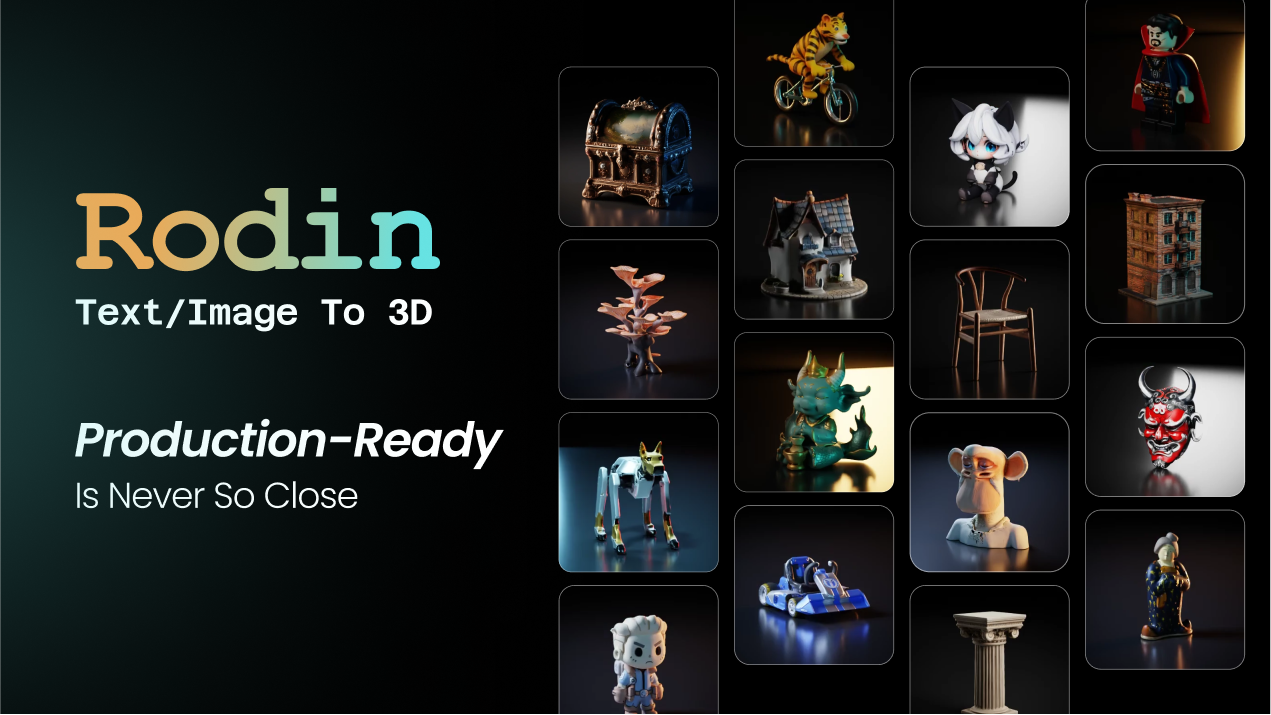
Hyper3D blew us away with its ability to generate 3D geometry that actually keeps a clean topology for simple objects. While many AI generators create messy “blob” meshes, the Rodin Gen-2 engine produces structured files you can actually use in a game engine. It’s the first time we’ve seen a tool handle multi-part objects without them fusing into a single unusable lump.
| Overall Score | 8.4/10 |
| Best For | Indie game devs and AR creators |
| Tested Plan | Free Trial / Pro @ $20/mo |
| Testing Period | 14 days |
| Biggest Strength | Clean quad-based mesh output |
| Biggest Weakness | High-poly export limits on free tier |
| Best Alternative | Meshy |
🤔 What Is Hyper3D?
Hyper3D, powered by DeemosTech, is a generative platform designed to turn text prompts or 2D photos into 3D assets. Unlike hobbyist tools, it focuses on production-ready files by providing PBR textures and rigged-ready geometry. It aims to solve the bottleneck of manual asset creation for developers building in Unity, Unreal Engine, or Maya.
The platform houses two main engines: ChatAvatar for hyper-realistic digital humans and Rodin for general objects. By using a proprietary dataset and diffusion models, it generates assets that include depth, normal, and lighting data right out of the box.
⚙️ How We Tested Hyper3D
We signed up for the Pro plan at $20 for one month to test the full export capabilities. We performed three specific founder-focused tasks: creating a stylized robot character from a text prompt, converting a photo of a real-world office chair into a 3D model, and exporting a GLB file to test directly in a basic web-based AR viewer.
✨ Key Features (What Actually Stood Out)
The tech behind Hyper3D is pushing the limits of what automated design workflows can handle without constant human cleanup.
- Rodin Gen-2 Engine — This generated far sharper edges on hard-surface models like computers and crates compared to version one.
- Partial Redo — We loved being able to select just the arm of a character and regenerate it without changing the rest of the body.
- Image-to-3D — Uploading a clear PNG with a transparent background resulted in a model with significantly better texture alignment than using text alone.
- OmniCraft Toolbox — This feature allowed us to sharpen textures and upscale resolutions after the initial model was already built.
- 4K PBR Textures — The high-tier exports provide separate maps for roughness and metalness, which made the assets look realistic under dynamic lighting.
💰 Hyper3D Pricing — Is It Worth It?
Hyper3D offers a generous starting point, but the best features like 4K textures and high-poly modes are locked behind the paid tiers. If you are just experimenting with content creation for social media, the free credits are enough, but professional exports require a subscription.
| Plan | Price | Best For | Watch Out For |
| Free | $0 | Hobbyists | Limited exports and lower mesh quality |
| Premium | $20/mo | Indie Developers | Monthly credit caps apply |
Our pick: Premium — The ability to export clean quad-meshes is what makes this tool valuable, and you need the paid credits to do it consistently.
🧪 What We Found During Testing
When we prompted for a “futuristic sci-fi crate,” the generation took about 40 seconds. The initial preview looked a bit soft, but once we ran the HighPack refinement, the corners sharpened up significantly. We were surprised that the mesh didn’t have the typical internal “self-intersection” errors that usually break 3D prints or game physics.
A founder in our community who runs a small game studio told us they used Rodin to generate all the background props for a VR prototype, which saved them from hiring a freelance modeler for basic environmental assets.
⚠️ Limitations We Found
- Complex Hands — As of late 2024, the tool still struggles with five-fingered hands, often merging fingers or creating anatomical glitches.
- Thin Surfaces — Generating very thin objects like a piece of paper or a leaf often results in a mesh with too much thickness.
- Attribute Bias — The text-to-3D engine sometimes ignores specific colors in a prompt if they aren’t the primary descriptor.
⚔️ Hyper3D vs Competitors
Hyper3D sits in the professional bracket of 3D AI generator tools, competing directly with platforms focused on game dev workflows.
| Competitor | Pick it instead of Hyper3D if… |
| Meshy | You need a more polished web interface and better community gallery browsing. |
| Sloyd | You specifically need procedural buildings and weapons rather than organic shapes. |
| Luma Labs | You want to focus on high-fidelity photogrammetry from video rather than generative text. |
👍 Pros & Cons
| ✅ Pros | ❌ Cons |
🎯 Who Should Use Hyper3D (And Who Shouldn’t)
✅ Use it if you:
- Are an indie developer needing rapid background assets for an environment.
- Need to quickly visualize a physical product prototype from a 2D sketch.
- Want to experiment with 3D AI within a ComfyUI or Blender workflow.
❌ Skip it if you:
- Need high-fidelity hero characters for cinematic movies, where MetaHuman is better.
- Only need 2D images and don’t actually require the depth of a 3D mesh.
- Are on a strict budget and cannot afford the credit-based export system.
❓ Frequently Asked Questions
Is Hyper3D free to use?
Yes, there is a free plan that allows for basic generations, but high-quality exports and specific engine features require a subscription.
What file formats can I export from Rodin?
You can export models in common industry formats including OBJ, FBX, and GLB/GLTF.
Can I use Hyper3D models in Unity?
Absolutely, the clean meshes and PBR textures are specifically designed for direct import into Unity and Unreal Engine.
Does Hyper3D support texturing?
Yes, the Rodin engine bakes PBR textures directly onto the model, including normal maps for high-definition detail on low-poly meshes.
What is Rodin Gen-2?
Gen-2 is the latest engine iteration that supports recursive part generation, meaning it can build complex objects with separate moving parts.
Can I turn a photo of a person into a 3D model?
Yes, the ChatAvatar tool within the Hyper3D ecosystem is specifically built for creating digital head assets from photographs.
Looking for more tools like this? See all design tools we’ve reviewed →
Discover more from AI Founder Kit
Subscribe to get the latest posts sent to your email.