🚀 Quick Verdict
Granola is the first meeting tool that doesn’t feel like a surveillance bot. We were surprised by how much better the summaries are when you feed the AI a few of your own shorthand bullets first. It effectively turns a messy 30-minute call into a perfectly formatted executive summary in seconds.
| Overall Score | 9.2/10 |
| Best For | Founders and VCs in back-to-back calls |
| Tested Plan | Business Plan ($14/mo) |
| Testing Period | 30 days |
| Biggest Strength | No awkward bot joining the call |
| Biggest Weakness | Desktop only (no mobile app yet) |
| Best Alternative | Otter AI |
🤔 What Is Granola?
Granola is an AI-powered notepad designed for people who want to stay present during meetings. Unlike traditional transcription tools, it runs locally on your Mac and listens to the system audio. This means no Granola Bot ever appears in your Zoom or Google Meet participants list.
It was built with a specific philosophy: AI shouldn’t replace your judgment. You jot down the highlights you care about, and Granola use its transcript context to flesh out the details, fix your typos, and organize everything into professional templates.
⚙️ How We Tested Granola
We tested the Business Plan at $14 per month for a full 30-day cycle. Our testing involved three specific founder workflows: recording a messy 1-on-1 brainstorming session, transcribing a high-stakes sales pitch, and using the AI Chat to draft a follow-up email based on technical requirements discussed in a product sync.
✨ Key Features (What Actually Stood Out)
The core value is how it handles the post-meeting workflow within your productivity routine without adding friction to the call itself.
- No-Bot Transcription — It records directly from your computer audio. We confirmed during testing that it captures both your mic and the other person’s audio clearly without any external plugins.
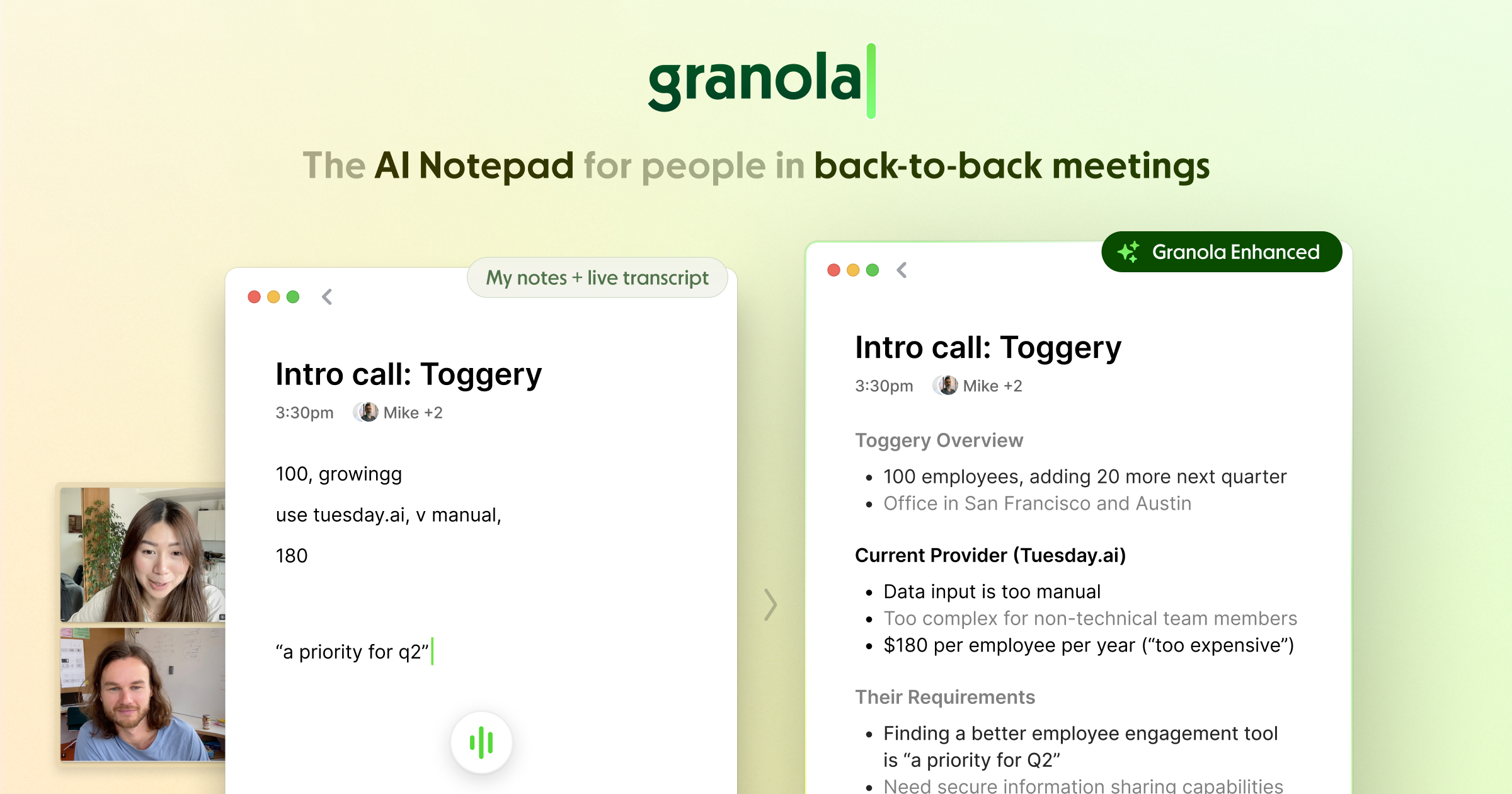
- Note Enhancement — You type short, messy notes in black text. After the call, the AI adds detail in gray text, which makes it very easy to see where the AI added its own interpretation.
- Smart Templates — We used the Sales Pipeline and 1 on 1 templates. The AI actually followed the structure we set, filling in relevant bullet points under the correct headers.
- Granola MCP — This allows you to pull meeting context directly into other tools like Claude or ChatGPT. We tested this to write a blog post based on a recorded interview without copying and pasting.
- Searchable Archive — Every word of every meeting is indexed. We were able to find a specific mention of a budget figure from a call three weeks prior in under five seconds.
💰 Granola Pricing — Is It Worth It?
The free tier is surprisingly generous for getting a feel for the app, but serious users will hit the history limits quickly. The upgrade is worth it specifically for the advanced automation integrations with tools like Slack and Notion.
| Plan | Price | Best For | Watch Out For |
| Basic | $0 | Occasional users | Limited history visibility |
| Business | $14/mo | Active founders | Billed per user |
| Enterprise | $35/mo | Large teams | Requires sales contact |
Our pick: Business Plan — It unlocks unlimited meeting history and the GPT-4o thinking models which are significantly better at parsing complex conversations.
🧪 What We Found During Testing
The installation is a desktop app, not a browser extension, which makes it feel much more stable. We found that the AI is remarkably good at “hearing” through background noise, like a coffee shop latte machine, which usually trips up other tools. The most useful moment was clicking a specific bullet point in our notes and having the app instantly play back the exact 5-second audio clip from the meeting.
A founder in our community who runs a boutique agency told us they finally stopped getting complaints from clients about uninvited bots sitting in on their strategy sessions.
⚠️ Limitations We Found
- Desktop Only — As of late 2024, there is no way to record a physical meeting using your phone through a mobile app.
- Language Limitations — While it supports multiple languages, its ability to format notes into complex custom templates is most consistent in English.
- No Live Video — It focuses entirely on text and audio; you won’t get a video recording of the meeting itself.
⚔️ Granola vs Competitors
Granola prioritizes privacy and clean UX over the bulkier, feature-heavy platforms that focus on recording video.
| Competitor | Pick it instead of Granola if… |
| Otter AI | You need a mobile app for recording in-person seminars or events. |
| Fireflies | You need a massive library of native integrations with niche CRMs. |
| Read AI | You want video playback and speaker sentiment tracking metrics. |
👍 Pros & Cons
| ✅ Pros | ❌ Cons |
🎯 Who Should Use Granola (And Who Shouldn’t)
✅ Use it if you:
- Are a founder who spends 4+ hours a day in Zoom or Google Meet.
- Want to take high-quality notes without looking like you are distracted by typing.
- Work in a sensitive industry where “meeting bots” are often blocked or banned.
❌ Skip it if you:
- Need full video recordings of your calls for compliance — use Fireflies instead.
- Only ever take notes on your iPhone or iPad during meetings.
- Need a tool that works entirely inside a browser without any local app installation.
🔐 Data & Privacy
Granola takes a strong stance on privacy by giving users the ability to opt out of model training at any time. It does not save the raw audio files permanently — it only keeps the text transcript and the processed notes, which is a major plus for internal security audits.
❓ Frequently Asked Questions
Does a bot join my Zoom meeting?
No, Granola captures audio directly from your computer’s system, so it works silently in the background.
Can I use Granola on my iPhone?
Currently, Granola is a desktop-only application and does not have a native mobile app for iOS or Android.
Is Granola better than Otter?
It is better for users who want to stay in control of the notes. Otter is more of a passive recorder, while Granola is built to enhance the notes you actually write.
Does it work with Microsoft Teams?
Yes, it works with Zoom, Google Meet, Teams, Slack, and any platform that plays audio on your computer.
Can I export my notes to Notion?
Yes, the Business plan includes integrations that allow you to send notes directly to Notion, Slack, and various CRMs.
Do my meetings train their AI?
You can opt out of AI model training in the settings menu on any plan, including the free version.
Looking for more tools like this? See all productivity tools we’ve reviewed →
Discover more from AI Founder Kit
Subscribe to get the latest posts sent to your email.