🚀 Quick Verdict
It doesn’t join as a bot, so nobody knows you’re using it. The real-time suggestions appeared within seconds of a question being asked. It’s built for people who need to stay sharp during high-stakes sales calls.
| Overall Score | 8.8/10 |
| Best For | Sales founders and recruiters |
| Tested Plan | Pro Plan at $20/month |
| Testing Period | 14 days |
| Biggest Strength | Invisible to other participants |
| Biggest Weakness | Requires desktop app installation |
| Best Alternative | Granola |
🤔 What Is Cluely?
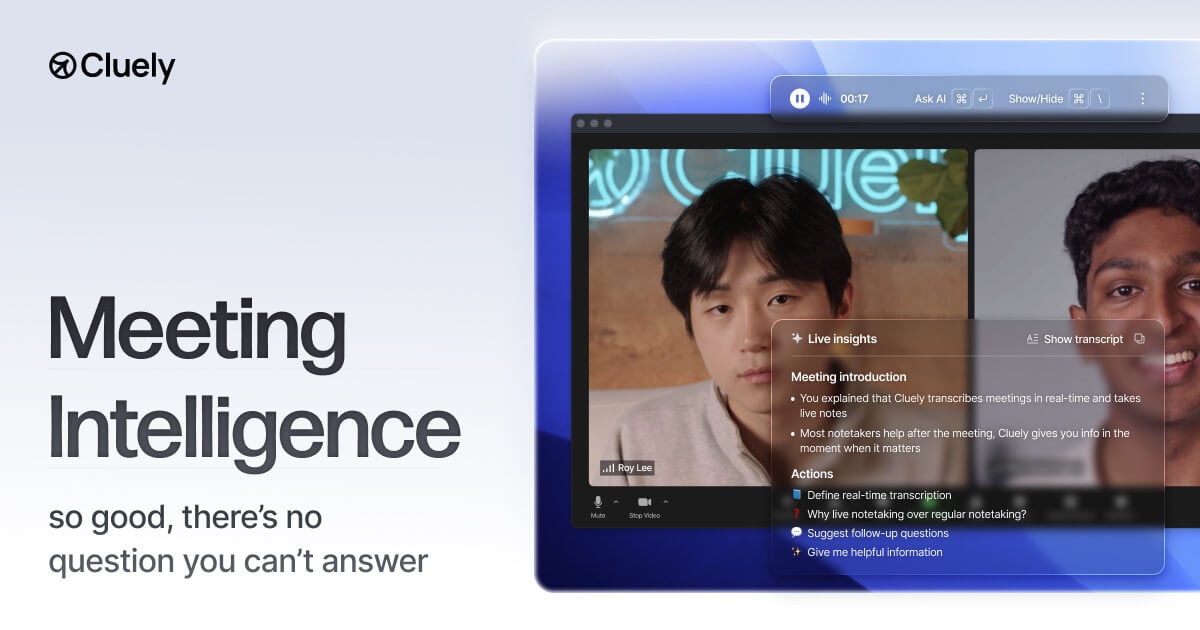
Cluely is a desktop-based AI assistant that listens to your meetings and watches your screen to provide live coaching. Unlike most AI notetakers, it doesn’t enter the call as a separate participant named David’s AI Notetaker. This makes it a preferred choice for interviews or sensitive negotiations where you don’t want to signal that you’re using AI assistance.
The tool was built to help users handle tough objections and ask better follow-up questions on the fly. It combines transcription with a knowledge base to give you answers while you’re still talking to the prospect or candidate.
⚙️ How We Tested Cluely
We tested the Pro plan for $20 over a 14-day period. Our team used it for three specific founder tasks: answering a technical pricing objection during a live sales demo, generating a formatted follow-up email within 60 seconds of a call ending, and using the people search feature to find a lead’s recent career history mid-conversation.
✨ Key Features (What Actually Stood Out)
The most impressive part of Cluely is how it handles automation of post-call tasks without being intrusive. Most tools focus on the transcript, but Cluely focuses on the moment you’re actually speaking.
- Live Insights — The app suggests what to say next or follow-up questions based on the current conversation. During a test call, it correctly identified a mention of a competitor and pulled up our internal comparison points.
- Undetectable Recording — It captures audio and screen data locally from your computer. This means no bot appears in the Zoom or Google Meet participant list.
- People Search — You can see background info on participants before or during the call. It pulled LinkedIn data for a prospect that helped us personalize the opening of the meeting.
- AI Follow Ups — It drafts emails based on the action items discussed. We found the drafts were 90% ready to send, requiring only minor tone adjustments.
- Knowledge Bases — On higher tiers, you can upload your own documents. This allows the AI to answer questions using your specific company data rather than general knowledge.
💰 Cluely Pricing — Is It Worth It?
Cluely is priced competitively for individual founders, but the best features are locked behind the Enterprise tier. The Pro plan is great for individuals, but teams will need to talk to sales for custom pricing and access to shared knowledge bases. You can explore more productivity options if you need a simpler tool for just notes.
| Plan | Price | Best For | Watch Out For |
| Pro | $20/mo | Solo founders | No team sharing features |
| Enterprise | Custom | Sales teams | Requires sales call to set up |
Our pick: Pro Plan — It provides the core undetectable recording and live coaching features that most founders need for their daily calls.
🧪 What We Found During Testing
Setup was fast, taking about 3 minutes to install the macOS app. During a sales call, the transcription was surprisingly accurate even with multiple people talking over each other. The 300ms response time for transcription is real; the text appears almost instantly as you speak.
We noticed that the AI suggestions are most helpful when you have a clear structure to your meeting. If the call becomes too chaotic, the “What should I say next?” feature sometimes gets confused and offers generic advice. However, the one-click follow-up email saved us at least 10 minutes per call by summarizing the next steps perfectly.
A founder in our community who runs a recruitment agency told us that the ability to search a candidate’s history mid-interview without switching tabs kept them focused on the conversation.
⚠️ Limitations We Found
- System Requirements — As of June 2025, you need Windows 11 or macOS 10.15 or later. Older machines might struggle with the 8GB RAM recommendation.
- Desktop Only — There is no mobile app for live coaching, so you can’t use these features if you take calls on your phone.
- Latency — While transcription is fast, the AI-generated answers can sometimes take 2-3 seconds to appear depending on your internet speed.
⚔️ Cluely vs Competitors
Most meeting assistants focus on the transcript after the call, while Cluely focuses on the live experience.
| Competitor | Pick it instead of Cluely if… |
| Otter.ai | You need a cheaper tool focused primarily on long-form transcription. |
| Granola | You prefer a manual notepad style where you control the AI output. |
| Fathom | You don’t mind a visible bot and want a free version for basic notes. |
👍 Pros & Cons
| ✅ Pros | ❌ Cons |
| Completely invisible to other call participants | Requires high system resources (RAM) | Enterprise features are locked behind custom pricing |
| Built-in people search for prospect research | No mobile support for live coaching |
| Drafts follow-up emails in seconds | Occasional latency in AI suggestions |
🎯 Who Should Use Cluely (And Who Shouldn’t)
✅ Use it if you:
- Are a founder doing high-stakes sales calls where appearing to use AI would be awkward.
- Need real-time answers to technical questions during customer success sessions.
- Want to automate your follow-up emails immediately after a call ends.
❌ Skip it if you:
- Use an older computer that doesn’t meet the RAM or OS requirements — try Otter.ai instead.
- Take most of your meetings on a mobile device.
- Only need a simple transcript and don’t care about live coaching.
🔐 Data & Privacy
Cluely is SOC 2, ISO 27001, and GDPR compliant. For Enterprise users, they explicitly state they do not train their AI models on your data. You can also request end-to-end encryption by contacting their support team.
🔌 Integrations
We specifically tested the HubSpot and Salesforce integrations via Merge.dev. The setup requires admin access to your CRM, but once connected, it successfully pushed meeting notes and activity history directly to the correct contact records without manual entry.
❓ Frequently Asked Questions
Does Cluely show up as a participant in Zoom?
No, Cluely is undetectable. It records your screen and audio locally from your desktop app rather than joining the call as a bot.
Is there a free version of Cluely?
Cluely offers a free trial to test the features, but the Pro plan costs $20 per month for ongoing use.
Can I use Cluely for job interviews?
Yes, many users use it for interviews because it provides real-time coaching suggestions without the interviewer knowing you are using AI.
Does Cluely work on Windows?
Yes, Cluely works on Windows 11. It requires an x64 processor and at least 8GB of RAM for the best experience.
Can I upload my own company documents to Cluely?
Yes, but this feature is part of the Enterprise tier’s Knowledge Base, which allows the AI to answer questions using your specific data.
Does Cluely support languages other than English?
Yes, Cluely supports over 12 languages, including Spanish and Chinese, with high transcription accuracy.
Looking for more tools like this? See all productivity tools we’ve reviewed →
Discover more from AI Founder Kit
Subscribe to get the latest posts sent to your email.