🚀 Quick Verdict
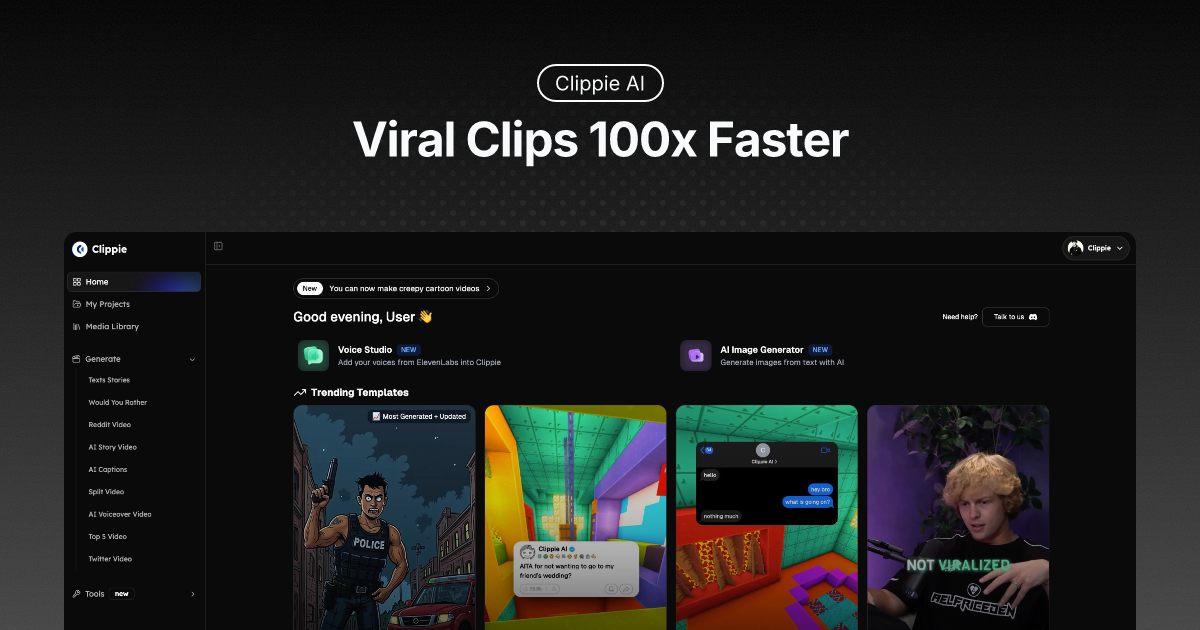
The Roblox Rant and Twitter Video templates are specific enough to save you an hour of layout work in Canva. We noticed the AI voiceovers sync with captions without manual tweaking. It handles the repetitive parts of faceless channels so you can focus on the script.
| Overall Score | 8.2/10 |
| Best For | Faceless YouTube creators |
| Tested Plan | Lite Plan ($19.99/mo) |
| Testing Period | 7 days |
| Biggest Strength | Niche-specific viral templates |
| Biggest Weakness | Credit-based advanced animations |
| Best Alternative | Pictory |
🤔 What Is Clippie AI?
Clippie AI is a production suite for creators who want to grow on social media without showing their face. It combines script generation, AI voiceovers, and automated scene assembly into one dashboard. Founders Bilal Chohan and Noah Gomes built it to solve the high cost of video editors for new channels.
The tool targets specific viral formats like horror stories, “Top 5” lists, and Reddit-style rants. It removes the need for cameras or microphones by using neural text-to-speech and AI-generated visuals. You provide an idea, and it produces a vertical video ready for upload.
⚙️ How We Tested Clippie AI
We signed up for the Lite Plan at $19.99 for one month. Our testing involved three specific founder tasks: generating a 60-second “Top 5” facts video from a single prompt, converting a five-tweet thread into a video, and creating a faceless story with a deep-toned AI voice. We monitored the export speed and caption accuracy for each project.
✨ Key Features (What Actually Stood Out)
The platform focuses on social media automation by using pre-built layouts that the algorithm already likes.
- Top 5 Moments — This template builds a numbered list video from just a text input. We found it useful for creating educational shorts without searching for stock footage.
- Auto-Captions — It supports over 100 languages and highlights words as they’re spoken. The timing was accurate on 95% of the words during our test.
- Twitter Videos — You can paste a link to a thread and it formats the tweets into a vertical video. This is much faster than taking manual screenshots.
- Voiceover Video — There are 50+ voices with different accents and tones. We liked the “horror” style voices for storytelling niches.
- Roblox Rant Videos — A very specific template that puts your script over Roblox gameplay. It’s a proven format for reaching younger audiences on TikTok.
💰 Clippie AI Pricing — Is It Worth It?
The pricing is based on export minutes rather than a per-video credit system, which makes budgeting easier for content creation workflows. Note that “advanced” scene animations require separate AI credits not included in the base minute count. This can be a surprise if you’re expecting everything to be included in the monthly fee.
| Plan | Price | Best For | Watch Out For |
| Lite | $19.99/mo | Beginners | 30-minute export limit |
| Creator | $34.99/mo | Active YouTubers | 120-minute limit |
| Pro | $69.99/mo | Agencies | 250-minute limit |
Our pick: Creator Plan — The 120-minute limit allows for roughly 100 short-form videos per month, which is enough to run two active channels.
🧪 What We Found During Testing
The speed of the workflow is the main draw. We went from a blank screen to a finished “Top 5” video in under 6 minutes. The AI-generated images matched the script context fairly well, though we had to swap out two images that looked a bit too “AI-style” for our taste. One surprise was the caption customization; you can change fonts and colors to match your brand easily.
A founder in our community who runs a faceless history channel told us they switched to this because it handles the caption timing better than their previous mobile app.
⚠️ Limitations We Found
- Visual Repetition — As of early 2025, many users are using the same stock backgrounds. You’ll need to upload your own clips to stand out from other AI channels.
- Credit System — Advanced scene animations aren’t free with the subscription. You have to buy top-up credits if you want high-end motion.
- Limited Manual Editing — You can’t move elements around with the precision of a timeline-based editor like Premiere Pro.
⚔️ Clippie AI vs Competitors
Clippie AI competes with tools that focus on stock footage and captions for social media.
| Competitor | Pick it instead of Clippie AI if… |
| Pictory | You want to turn long blog posts or webinars into short clips using stock footage. |
| InVideo | You need more manual control over the video timeline and layers. |
| Vsub | You already have the video and only need high-quality automated captions. |
👍 Pros & Cons
| ✅ Pros | ❌ Cons | Advanced features require extra credits | Templates can feel generic if not customized | Limited export minutes on the Lite plan | AI images can sometimes look inconsistent |
🎯 Who Should Use Clippie AI (And Who Shouldn’t)
✅ Use it if you:
- Are a solo founder running multiple faceless YouTube or TikTok accounts.
- Want to test a new niche quickly without hiring a video editor.
- Need to convert text threads or lists into video format at scale.
❌ Skip it if you:
- Need high-end cinematic control — use Runway instead.
- Are making corporate explainers that require specific brand assets.
- Have a zero-dollar budget, as there is no permanent free tier.
❓ Frequently Asked Questions
Is there a free version of Clippie AI?
Clippie AI usually requires a paid subscription to export videos, though they sometimes offer a trial period for new users.
Can I monetize videos made with Clippie AI?
Yes, since you own the rights to the generated content on paid plans, you can apply for the YouTube Partner Program.
Does Clippie AI work for languages other than English?
Yes, it supports captions and voiceovers in over 102 languages, making it good for global channels.
What are AI credits used for?
Credits are used for premium features like advanced scene generation and specific animations that go beyond the basic template.
How many videos can I make per month?
On the Lite plan, you get 30 minutes of export. If your shorts are 60 seconds long, that is roughly 30 videos.
Can I cancel my subscription anytime?
Yes, the platform allows you to cancel from your account settings without hidden fees or long-term contracts.
Looking for more tools like this? See all YouTube tools we’ve reviewed →
Discover more from AI Founder Kit
Subscribe to get the latest posts sent to your email.