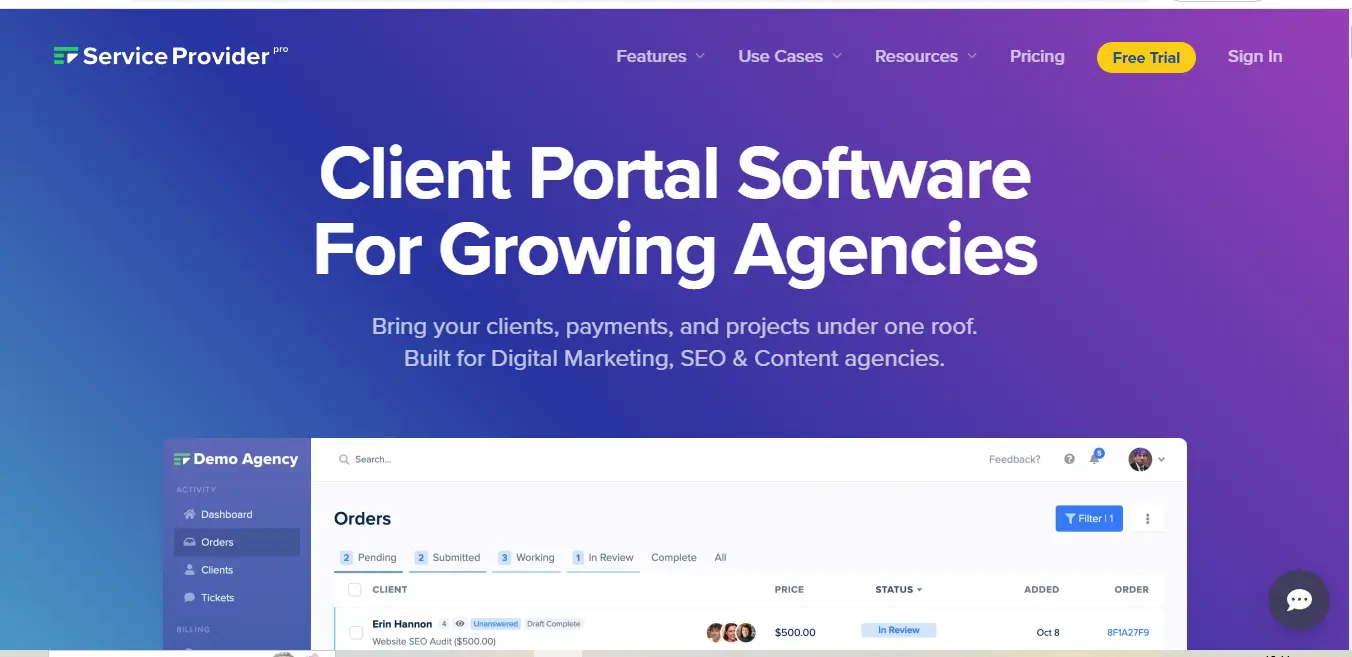
⚡ What is Service Provider Pro?
Service Provider Pro, commonly known as SPP.co, is a comprehensive client portal and service delivery platform designed specifically for agencies and service-based businesses. Founded in 2016 by Gabe Mays, the platform emerged from the real-world challenges faced by service providers in managing client relationships and automating repetitive tasks. At its core, SPP.co serves as a bridge between service providers and their clients, offering a sophisticated yet user-friendly interface that handles everything from order management to payment processing.
The platform was built with a clear vision: to eliminate the chaos that often comes with running a service-based business. Rather than cobbling together multiple tools for client communication, project management, and billing, SPP.co provides a unified solution that handles the entire client service lifecycle. This integrated approach means that agencies can manage their entire operation from a single dashboard, significantly reducing the time spent switching between different tools and maintaining various systems.
🎯 Service Provider Pro Features
Service Provider Pro’s feature set is strategically designed to address the common pain points faced by service businesses. Let’s explore its key capabilities in detail:
Client Portal Excellence
The platform’s client portal serves as a centralized hub where clients can interact with your business. Unlike basic client portals, SPP.co’s implementation includes sophisticated order forms with conditional logic, allowing you to gather exactly the information you need based on the service being requested. Clients can track their orders, communicate with your team, and access deliverables, all within a branded environment that maintains your company’s professional image.
Automation Framework
The automation capabilities of SPP.co extend far beyond simple task automation. The platform includes a powerful workflow engine that can handle complex business processes. For instance, when a new order comes in, the system can automatically assign team members, trigger welcome emails, create associated tasks, and even start billing cycles. These workflows can be customized to match your specific service delivery process, ensuring consistency while reducing manual intervention.
Order Management System
The order management system is particularly noteworthy for its flexibility. It handles both one-time services and recurring subscriptions with equal proficiency. Each order can be tracked through customizable stages, and the system automatically maintains a detailed audit trail of all activities. This becomes invaluable when managing high-volume services or when compliance documentation is required.
👥 What Service Provider Pro Does Exceptionally Well
Service Provider Pro truly excels in several key areas that set it apart from generic business management tools:
Seamless Service Delivery
The platform shines in its ability to streamline service delivery processes. By combining order forms, client communication, and delivery workflows in one system, it ensures that nothing falls through the cracks. The system maintains clear accountability by tracking who’s responsible for what and when deliverables are due.
Client Experience Management
SPP.co has mastered the art of creating a professional client experience. The white-label capabilities go beyond simple logo placement – they allow for complete customization of the client interface, including custom domains, branded emails, and personalized client portals. This level of customization helps agencies present a cohesive, professional image to their clients.
Financial Operations
The platform’s handling of financial operations is particularly sophisticated. It manages everything from initial quotes to final invoices, supporting multiple payment gateways and currencies. The subscription billing system is robust enough to handle complex pricing models, including usage-based billing and custom pricing rules.
Getting Started with Service Provider Pro?
The onboarding process with Service Provider Pro is structured to get agencies operational quickly while ensuring they can take full advantage of the platform’s capabilities:
- Initial Setup Phase
The journey begins with setting up your branded client portal. SPP.co provides a setup wizard that guides you through the essential configurations, including branding elements, domain settings, and payment gateway integration. This phase typically takes 1-2 days to complete thoroughly. - Service Configuration
Next comes the crucial step of setting up your services. This involves creating detailed service descriptions, configuring order forms, and establishing delivery workflows. SPP.co provides templates and examples to help you structure your services effectively. - Team Onboarding
The platform includes tools for adding team members and setting up appropriate access levels. You can define roles and permissions, ensuring team members have access to the tools they need while maintaining security.
🔄 Service Provider Pro Use Cases
Service Provider Pro is particularly well-suited for:
Digital Service Providers
Marketing agencies, SEO services, and content creation teams find SPP.co invaluable for managing high-volume, recurring services. The platform’s ability to automate routine tasks while maintaining quality control makes it ideal for scaling digital service operations.
Professional Service Firms
Consulting firms and professional service providers benefit from the platform’s sophisticated client management capabilities. The system helps maintain professional relationships while efficiently managing service delivery and billing.
Managed Service Providers
IT service providers and managed service companies can leverage SPP.co’s robust ticketing and subscription management features to handle ongoing client relationships and recurring services.
Current User Base
Service Provider Pro has built a strong following among various service providers, including:
- Digital marketing agencies managing multiple client campaigns
- Content writing services handling high-volume content production
- SEO agencies delivering recurring optimization services
- Web development firms managing client projects
- Consulting firms providing ongoing advisory services
Unique Value Proposition
What truly sets Service Provider Pro apart is its laser focus on service-based businesses. Unlike generic business management tools, every feature is designed with service delivery in mind. The platform’s unique strengths include:
Industry-Specific Automation
The automation capabilities are specifically tailored for service businesses, with pre-built workflows that match common service delivery patterns while remaining customizable for specific needs.
Scalability Focus
The platform is built to grow with your business, handling increasing client loads and service complexity without requiring significant changes to your processes.
Client-Centric Design
Every feature is designed with both the service provider and the client in mind, creating a balanced system that serves both audiences effectively.
Compatibilities and Integrations
Service Provider Pro offers a robust integration ecosystem that extends its capabilities:
Native Integrations
- Payment Processors: Seamless integration with Stripe, PayPal, and Square
- Communication Tools: Integration with major email providers and Slack
- File Storage: Direct connections to Google Drive and Dropbox
- Accounting Software: QuickBooks and Xero integration for financial management
API Capabilities
The platform provides a comprehensive API that allows for custom integrations with:
- Custom CRM systems
- Specialized service delivery tools
- Business intelligence platforms
- External reporting systems
Webhook Support
SPP.co’s webhook system enables real-time data synchronization with external systems, allowing for automated workflows across your entire tool stack.
.svg)
💰 Service Provider Pro Pricing
Service Provider Pro’s pricing strategy is designed to accommodate growing businesses while providing value at each tier. Let’s examine each plan in detail to understand what they offer and who they’re best suited for:
Starter Plan ($99/month)
The Starter plan serves as an entry point for small agencies or solo service providers beginning to systematize their operations. This tier includes the essential features needed to manage client relationships and deliver services professionally. You’ll get access to the basic client portal functionality, allowing you to handle up to 100 orders per month with support for two team members. While this plan lacks some of the advanced automation features, it provides a solid foundation for understanding and implementing SPP.co’s core capabilities.
Professional Plan ($149/month)
The Professional plan represents the sweet spot for most growing agencies. This tier removes the order volume limitations and expands team capacity to five members. The significant advantage of this plan lies in its advanced automation capabilities, which can dramatically improve operational efficiency. You’ll gain access to sophisticated workflow tools, enhanced reporting features, and priority support. The Professional plan is particularly valuable for agencies handling multiple clients with recurring services.
Enterprise Plan (Custom Pricing)
The Enterprise plan is tailored for larger organizations with specific needs. This tier offers unlimited everything – from team members to order volume – and includes dedicated support. What sets this plan apart is the ability to request custom features and integrations, making it ideal for organizations with unique workflow requirements or specific compliance needs. Enterprise clients also receive advanced security features and custom training sessions for their teams.
Additional Pricing Considerations
- All plans include full white-labeling capabilities
- Annual billing options offer a 10% discount
- Add-on features available for specific needs
- No long-term contracts required
- Free trial available for all plans
🆚 Service Provider Pro Alternatives
When evaluating Service Provider Pro against its competitors, it’s essential to understand how each platform serves different business needs. Here’s a detailed comparison:
| Feature/Tool | Service Provider Pro | Plutio | ClientPortal.space | Dubsado | HoneyBook |
|---|---|---|---|---|---|
| Starting Price | $99/month | $19/month | $29/month | $35/month | $39/month |
| Best For | Service agencies | Freelancers | Small agencies | Creative businesses | Service professionals |
| Client Portal | Advanced | Basic | Intermediate | Basic | Intermediate |
| Automation | Comprehensive | Limited | Basic | Moderate | Moderate |
| White-labeling | Full | Partial | Full | Limited | Limited |
| Payment Processing | Multiple gateways | Limited options | Basic | Good | Comprehensive |
| Project Management | Advanced | Excellent | Basic | Good | Good |
| Learning Curve | Steep | Moderate | Easy | Moderate | Easy |
| Support Quality | Priority support | Community-based | Email support | 24/7 support | Chat support |
Service Provider Pro ⚖️ Pros & Cons
- Comprehensive white-label capabilities
- Strong automation features
- Flexible payment processing options
- Excellent client management tools
- Regular feature updates
- Robust API for custom integrations
- Steeper learning curve
- Higher starting price point
- Limited native integrations
- Basic reporting features
- Mobile app limitations
⚡ Service Provider Pro Tutorial: Getting Started
Setting up Service Provider Pro effectively requires a structured approach. Here’s a comprehensive guide to getting started:
Initial Setup (Day 1)
Begin by configuring your branded environment. This involves setting up your domain, uploading your logo, and customizing your color scheme. Take time to understand the dashboard layout and basic navigation. The platform provides an interactive tour that highlights key features and functionality.
Service Configuration (Days 2-3)
The next crucial step is setting up your services. Start with one core service to understand the process:
- Create a detailed service description
- Design your order form using conditional logic
- Set up pricing and payment options
- Configure automated emails and notifications
- Establish delivery workflows
Team and Client Onboarding (Days 4-5)
Once your basic setup is complete, focus on:
- Adding team members and setting permissions
- Creating client categories and access levels
- Setting up communication templates
- Establishing standard operating procedures
- Testing the complete workflow
⚖️ Why Service Provider Pro May Not Be The Best Choice?
While Service Provider Pro offers robust features, certain factors might make it less suitable for some businesses:
Cost Considerations
The platform’s pricing structure, starting at $79/month, positions it at a higher price point compared to simpler alternatives. For solo practitioners or businesses just starting out, this investment might be challenging to justify, especially when more basic tools could suffice initially.
Complexity and Learning Curve
Service Provider Pro’s comprehensive feature set comes with increased complexity. The platform requires significant time investment to fully understand and utilize all its capabilities. Businesses looking for a simple, plug-and-play solution might find the learning curve too steep.
Technical Requirements
The platform’s advanced features often require technical knowledge to implement effectively. Organizations without technical expertise might struggle to maximize the platform’s potential, particularly when it comes to custom integrations and advanced automation workflows.
🎓 Expert Opinion
Based on extensive analysis and user feedback, industry experts position Service Provider Pro as a robust solution for growing service businesses. Sarah Chen, a digital agency consultant with 15 years of experience, notes: “Service Provider Pro stands out for its automation capabilities and scalability. While it may be overkill for freelancers, it’s practically indispensable for agencies handling multiple clients and recurring services.”
Mark Thompson, a SaaS review specialist, adds: “The platform’s strength lies in its ability to standardize complex service delivery processes. However, businesses should be prepared for a learning curve and ensure they have the resources to fully implement the system.”
✨ Summary: Is Service Provider Pro Right for You?
Service Provider Pro emerges as a powerful solution for service-based businesses ready to scale their operations. The platform excels in automating complex workflows and providing a professional client experience, making it particularly valuable for growing agencies and established service providers.
Key Takeaways:
- Ideal for businesses handling multiple clients and recurring services
- Strong automation capabilities that can significantly reduce manual work
- Professional white-label solutions for brand consistency
- Higher price point justified by comprehensive feature set
- Requires commitment to setup and implementation
The platform represents a significant investment in both cost and setup time, but for businesses ready to scale their operations and streamline their service delivery, Service Provider Pro offers a robust and comprehensive solution that can transform how they operate and serve their clients.
Service Provider Pro FAQs❓
Can I customize the client portal with my brand?
Yes, SPP.co offers comprehensive white-labeling options including custom domain support, logo placement, and color scheme customization.
What payment gateways does SPP.co support?
SPP.co integrates with major payment processors including Stripe, PayPal, and Square, allowing for various payment methods and currencies.
Is there a limit to the number of clients I can manage?
No, SPP.co doesn’t limit the number of clients you can manage, though order volumes may be limited on certain plans.
Can I migrate from another platform?
Yes, SPP.co provides migration assistance and API access for transferring data from other platforms.
Does SPP.co offer multilingual support?
Yes, the platform supports multiple languages and can be customized for international clients.
What kind of support is available?
SPP.co offers email support on all plans, with priority support available on higher tiers.
Important Links:
- Support: [email protected]
- Twitter: https://twitter.com/spp_app
- LinkedIn: https://www.linkedin.com/company/sppapp/
- Documentation: https://docs.spp.co
Discover more from AI Founder Kit
Subscribe to get the latest posts sent to your email.