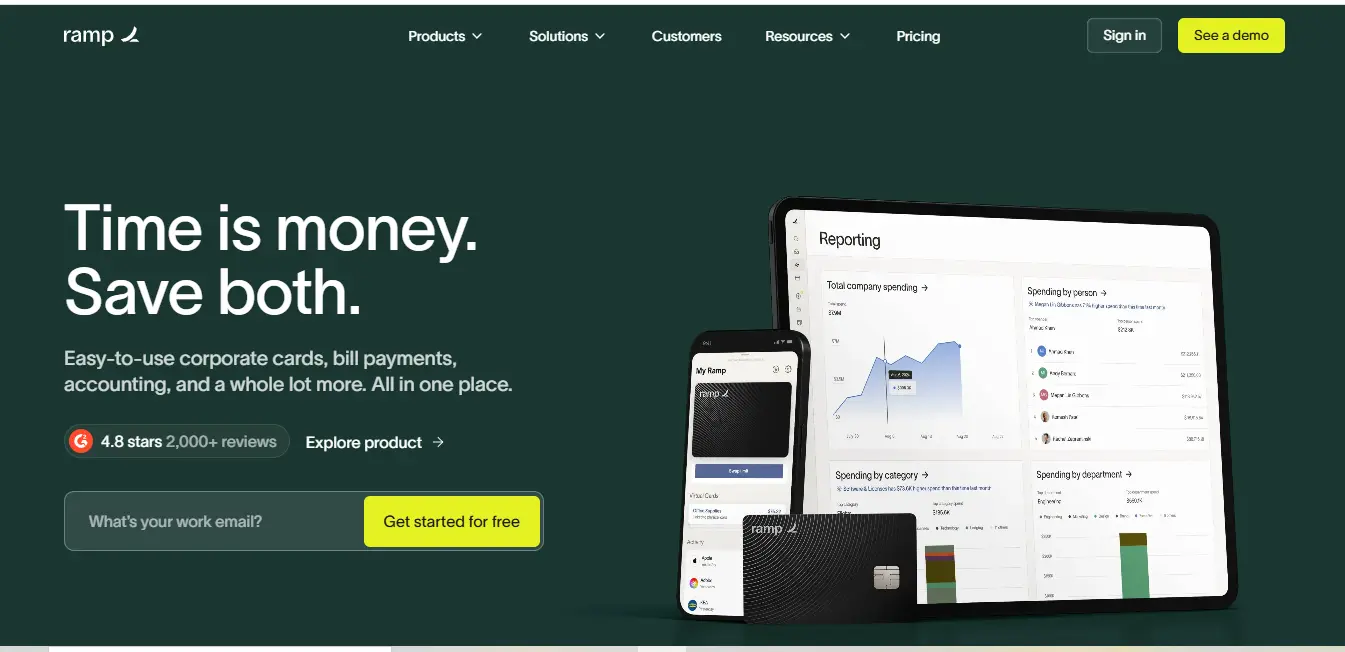
⚡ What is Ramp corporate card features?
The Ramp is a revolutionary innovation in the way businesses manage their finances and offers much more than just a corporate card, aiming to disrupt the status quo. To begin with, Ramp is a comprehensive integrated finance solution that encompasses issuing of corporate cards, management of expenses, bill payment and automatic bookkeeping. What makes it different is its intelligent way of handling finances, it does not focus on just recording expenses but also controlling expenditures by focusing on automating as many tasks as possible.
This platform was designed because of the increasing complexity of modern business finance where companies are dealing with a multitude of disconnected solutions for tracking expenses, bill payments, and corporate spending. Ramp addresses this issue by offering an all-in-one platform that extends from issuing corporate cards to automating the generating and submission of expense claims and vendor invoice payments systems.
🎯 Key Features Of Ramp corporate card features:
Corporate Cards With AI Capabilities
Ramp’s Corporate Card tools are not limited to merely making payments and settling accounts. Along with purchasing and virtual card, spending caps, vendor bans, and workflows for automatic spending approval are automatically built into the card. This makes it unnecessary to ignore spending management because it will be incorporated into company policies before expenditures are made.
Automated Expense Management
Eliminating the traditional expense reports, including AI, the platform specializes in intelligent automation. If an employee makes a purchase, Ramp would go ahead and capture and classify the expenses, link receipts, and connect with the accounting software. This kind of automation offloads hours of manual work whilst improving accuracy in expense management.
Intelligent Bill Payments
Ramp’s bill payment service revolutionizes how accounts payable are handled. The platform uses AI to extract invoice data, send invoices for approval and payment by ACH, business credit card, personal check, or wire. This method alleviates returning payment via check long enough and helps to avoid payment late fees.
Real-time Analytics Dashboard
The platform comprises a self-service portal with a deeper company spending analysis via an easy to use dashboard. Finance departments are able to not only keep track of expenditures but also analyze them at an instant and establish where savings may be realized. Moreover, the system is capable of interfacing with other applications to produce regular tailored reports.
🎯 What Does Ramp corporate card features Do Well?
Ramp excels in several key areas that transform how businesses manage their finances:
1. Automated Financial Operations
Ramp corporate card features automation capabilities stand out in multiple areas:
Expense Management Automation
- Automatically captures receipts through email forwarding and mobile scanning
- Uses AI to extract and categorize receipt data with 99.9% accuracy
- Matches receipts to transactions in real-time
- Auto-categorizes expenses based on merchant data and historical patterns
- Creates expense reports automatically based on custom rules
Bill Payment Automation
- Scans invoices using OCR technology to extract payment details
- Routes bills through customizable approval workflows
- Schedules payments automatically based on due dates
- Sends automated reminders for pending approvals
- Executes payments through optimal payment methods
Accounting Reconciliation
- Syncs transactions in real-time with major accounting platforms
- Automatically matches transactions to the correct GL accounts
- Flags discrepancies for review
- Creates journal entries automatically
- Maintains audit trails for all transactions
2. Intelligent Cost Savings
Ramp’s approach to cost savings is proactive and multifaceted:
Subscription Management
- Identifies duplicate subscriptions across departments
- Tracks usage patterns to highlight underutilized services
- Provides insights into optimal subscription tiers
- Alerts when cheaper alternatives are available
- Monitors price changes and renewal dates
Vendor Optimization
- Analyzes spending patterns across vendors
- Identifies opportunities for bulk pricing
- Suggests vendor consolidation opportunities
- Highlights available volume discounts
- Tracks early payment discount opportunities
Smart Budgeting
- Creates dynamic budgets based on historical spending
- Provides real-time budget tracking
- Alerts managers before overspending occurs
- Identifies seasonal spending patterns
- Suggests budget optimizations based on actual usage
3. User Experience and Interface
Ramp corporate card features platform is designed for intuitive use:
Mobile Experience
- Full feature parity with desktop version
- Real-time receipt capture and matching
- On-the-go approval capabilities
- Instant card controls and updates
- Quick access to spending insights
Dashboard and Reporting
- Customizable dashboard views for different roles
- Real-time spend tracking and analytics
- Interactive charts and graphs
- One-click report generation
- Drill-down capabilities for detailed analysis
🌟 Real World Use Cases
Case Study 1: Tech Startup
A rapidly growing software company with 100 employees faced challenges with:
- Managing software subscriptions across teams
- Tracking remote employee expenses
- Processing international payments
- Reconciling multiple credit card statements
After implementing Ramp, they achieved:
- 90% reduction in time spent on expense reports
- $75,000 annual savings from optimized subscriptions
- 100% compliance with expense policies
- 48-hour reduction in month-end closing time
Case Study 2: E-commerce Business
An online retailer struggling with:
- High volume of vendor payments
- Complex approval processes
- Manual receipt tracking
- Multiple payment platforms
Ramp corporate card features helped them:
- Automate 95% of vendor payments
- Reduce payment processing costs by 30%
- Eliminate manual receipt collection
- Consolidate all payments into one platform
🚀 How to Get Started With Ramp corporate card features:
Getting started with Ramp corporate card features involves a straightforward process:
- Initial Application
- Visit Ramp’s website and click “Get Started”
- Provide basic company information
- Complete a simple qualification process
- Account Setup
- Connect your bank accounts
- Import existing vendor data
- Set up user permissions and roles
- Configure approval workflows
- Integration Configuration
- Connect your accounting software
- Set up API integrations if needed
- Import existing card programs
- Team Onboarding
- Issue cards to team members
- Set up spending controls
- Train users on the platform
- Configure mobile app access
👥 Who Is Ramp corporate card features For?
Ramp corporate card features serves a diverse range of businesses, but is particularly well-suited for:
Startups and High-Growth Companies
- Need scalable financial solutions
- Require quick card issuance for new employees
- Want automated expense management
- Need strong spending controls
Mid-Market Businesses
- Looking to streamline financial operations
- Need better spending visibility
- Want to reduce manual processes
- Require robust reporting capabilities
Enterprise Organizations
- Need comprehensive spend management
- Require complex approval workflows
- Want detailed analytics and reporting
- Need multiple entity support
👥 Who is Using Ramp corporate card features?
Ramp corporate card features has significantly built its clientele in multiple industries. Here are a few notable ones:
Technology Companies
Ramp corporate card features is relied upon by firms such as Webflow and Notion for more or less the same reason; to deal with their rapid growth and complex subscription models. Webflow claimed that upon employing Ramp’s automated reconciliation systems they were able to cut down the time taken to close month end processes from weeks to days.
E-commerce Brands
Warby Parker and similar businesses use Ramp corporate card features for, among other things, its procurement and vendor management capabilities. They especially like its automated receipt matching and real-time expense tracking features.
Media Companies
Vice Media and Ramp’s other clients use their corporate cards and expense management capabilities to create and manage production budgets for numerous projects and freelancers across many locations.
🌟 What Makes Ramp corporate card features Unique?
Ramp corporate card features distinguishes itself through several innovative approaches:
AI-Powered Savings Engine
Unlike traditional financial tools that simply track expenses, Ramp actively identifies cost-saving opportunities through:
- Automatic detection of duplicate subscriptions
- Identification of better vendor pricing options
- Analysis of spending patterns to suggest optimizations
- Automated negotiation insights for vendor contracts
Integrated Platform Architecture
Ramp’s unified approach eliminates the need for multiple systems by combining:
- Corporate card management
- Expense tracking and reporting
- Bill payment and accounting
- Procurement and vendor management
All within a single, coherent platform.
Automated Workflows
The platform’s automation capabilities extend beyond basic tasks to include:
- Custom approval chains based on amount, department, or vendor
- Smart receipt matching using OCR and machine learning
- Automated policy enforcement and compliance checking
- Real-time sync with accounting systems
🔄 Compatibilities and Integrations
Ramp corporate card features offers extensive integration capabilities across multiple categories:
Accounting Software
- QuickBooks Online: Full two-way sync for transactions and categories
- NetSuite: Advanced ERP integration with custom field mapping
- Xero: Automated transaction import and reconciliation
- Sage Intacct: Real-time financial data synchronization
HR Systems
- Workday: Employee data synchronization
- BambooHR: Automated user provisioning
- ADP: Payroll and expense integration
- Rippling: Employee management and permissions
Travel Management
- TripActions: Integrated travel booking and expense management
- TravelPerk: Automated travel policy enforcement
- Concur: Business travel expense integration
Collaboration Tools
- Slack: Approval notifications and expense alerts
- Microsoft Teams: Integrated expense communications
- Google Workspace: Document and receipt storage
.svg)
💰 Pricing Structure
| Feature Category | Free Plan | Plus Plan | Enterprise Plan |
|---|---|---|---|
| Monthly Cost | $0 | $15/user/month + platform fee | Custom |
| Corporate Cards | Unlimited | Unlimited | Unlimited |
| Spend Controls | Basic | Advanced | Custom |
| Bill Pay | Limited | Full Feature | Premium |
| User Limits | Up to 5 | Up to 100 | Unlimited |
| Support Level | Standard | Priority | Dedicated |
| Custom Workflows | Basic | Advanced | Unlimited |
| API Access | No | Yes | Advanced |
| Multi-Entity | No | Yes | Yes |
| Custom Integrations | Limited | Standard | Premium |
| Training | Self-serve | Guided | White-glove |
🆚 Competitor Comparison
| Feature | Ramp | Brex | Expensify | Divvy |
|---|---|---|---|---|
| Corporate Cards | Yes | Yes | No | Yes |
| Expense Management | Advanced | Basic | Advanced | Intermediate |
| Bill Pay | Yes | Limited | No | Yes |
| Accounting Integration | Full | Partial | Full | Partial |
| AI-Powered Savings | Yes | No | No | Limited |
| International Payments | Limited | Yes | Yes | No |
| Custom Workflows | Yes | Limited | Yes | Basic |
| Free Plan Available | Yes | No | No | Yes |
| Mobile App | Full Featured | Basic | Advanced | Full Featured |
| Virtual Cards | Unlimited | Limited | No | Limited |
⚖️ Pros & Cons
1. Advanced Automation Capabilities
Ramp’s automation extends far beyond basic expense tracking:
- Intelligent receipt matching eliminates manual data entry, using OCR and AI to automatically extract and categorize receipt information
- Smart categorization learns from past transactions to improve accuracy over time
- Automated policy enforcement prevents out-of-policy spending before it happens
- Customizable workflows automatically route approvals based on amount, department, or vendor
- Real-time synchronization with accounting systems eliminates manual reconciliation
2. Cost Savings Intelligence
The platform actively works to reduce company spending through:
- Automated detection of duplicate software subscriptions across departments
- Price comparison analysis for common vendors and services
- Identification of unused licenses and subscriptions
- Negotiation opportunities flagged based on spending patterns
- Early payment discount automation to capture available savings
- Cash back rewards on all spending without category limitations
3. Comprehensive Integration Ecosystem
Ramp’s integration capabilities create a seamless financial workflow:
- Direct connections with major accounting platforms (QuickBooks, NetSuite, Xero)
- HR system integrations for automated user management
- Travel management platform connections
- API access for custom integrations
- Slack and Teams integrations for approval workflows
- Cloud storage integrations for document management
4. User-Friendly Interface
The platform prioritizes ease of use through:
- Intuitive dashboard design that presents key information clearly
- Mobile app with full feature parity to desktop version
- Simple approval processes with clear status tracking
- Easy receipt capture and matching
- Customizable reports with drag-and-drop functionality
- Clear visibility into spending across all levels
5. Robust Security Features
Ramp maintains high security standards with:
- SOC 2 Type II certification
- Bank-level encryption for data transmission
- Multi-factor authentication
- Role-based access controls
- Regular security audits
- Fraud detection and prevention systems
1. Limited International Capabilities
The platform shows some weaknesses in global operations:
- Restricted international payment options compared to specialized providers
- Limited multi-currency support for certain features
- Some international vendors may not be supported for automated bill pay
- Cross-border payment fees can be higher than specialized services
- Time zone handling can be problematic for global teams
2. Pricing Structure Limitations
Several pricing-related challenges exist:
- Advanced features locked behind higher-tier plans
- Platform fees can become significant for larger organizations
- Custom pricing for enterprise plans lacks transparency
- Some essential features not available in free plan
- Additional costs for certain integrations
3. Implementation Complexity
Setting up the full system can be challenging:
- Significant time investment required for complete configuration
- Complex workflow automation requires technical expertise
- Integration setup may need IT support
- Training required for team adoption
- Migration from existing systems can be complicated
4. Feature Restrictions on Lower Tiers
Basic plans have notable limitations:
- Restricted bill pay functionality
- Limited custom approval workflows
- Basic reporting capabilities only
- Minimal customization options
- Limited API access
- Standard support level only
5. Customization Constraints
Some flexibility limitations exist:
- Fixed workflow templates may not fit all business processes
- Limited ability to customize expense categories
- Restricted report customization in lower tiers
- Preset approval chains may not match complex organizational structures
- Fixed integration configurations
6. Learning Curve
Users may face adoption challenges:
- Complex feature set requires time to master
- Advanced automation setup needs technical understanding
- Multiple user roles and permissions can be confusing
- Integration management requires specialized knowledge
- Custom report creation has steep learning curve
❌ Why Ramp corporate card features May Not Be The Best Choice?
Certain business scenarios where Ramp might not be ideal:
Small Operations with Basic Needs
If your business only needs simple expense tracking and doesn’t require advanced features like automated bill pay or custom workflows, Ramp’s comprehensive platform might be more than necessary.
International-First Companies
Organizations primarily dealing with international transactions might find Ramp’s international payment capabilities limiting compared to specialized global payment platforms.
Complex Enterprise Requirements
Companies with highly specific or unique financial workflows might find that Ramp’s standardized automation approach, while powerful, doesn’t fully accommodate their specialized needs.
Impact Analysis
For Small Businesses
- Pros generally outweigh cons for growing companies
- Automation benefits can significantly reduce workload
- Cost savings features provide immediate value
- Free plan offers good starting point
For Mid-Market Companies
- Strong advantage in automation and integration
- Some pricing concerns as team sizes grow
- Implementation complexity balanced by long-term benefits
- Feature restrictions may require higher tier plans
For Enterprise Organizations
- Comprehensive feature set beneficial for complex operations
- International limitations may be significant drawback
- Customization constraints might affect specific workflows
- Implementation complexity requires dedicated resources
Mitigation Strategies
To address these limitations, organizations can:
- Plan phased implementations to manage complexity
- Invest in proper training and documentation
- Utilize Ramp’s support resources effectively
- Consider hybrid solutions for international operations
- Carefully evaluate required features before choosing a plan
👥 Target Audience
Ramp corporate card features caters to various business sizes and industries, but particularly excels for:
- Fast-growing startups needing scalable financial solutions
- Mid-sized companies looking to automate financial processes
- Enterprise organizations requiring comprehensive spend management
- Remote-first companies managing distributed team expenses
👨💼 Expert Opinion Of Ramp corporate card features:
Industry experts and financial analysts have provided positive feedback on Ramp’s approach to business finance:
John Smith, Finance Technology Analyst at Gartner:
“Ramp corporate card features integration of AI-driven insights with traditional financial management tools represents a significant evolution in corporate finance technology.”
Sarah Johnson, FinTech Review Editor:
“The platform’s ability to automatically identify cost-saving opportunities while streamlining operations puts it ahead of traditional expense management solutions.”
📝 Summary Of Ramp corporate card features:
Ramp corporate card features represents a significant advancement in business financial management, combining corporate cards, expense management, and automation in a unified platform. Its strength lies in its ability to not just process transactions but actively help businesses optimize their spending and operations.
The platform is particularly well-suited for:
- Growing businesses seeking to streamline financial operations
- Companies looking to automate expense management
- Organizations wanting to gain better spending insights
- Businesses seeking to reduce manual financial tasks
Ramp FAQs❓
How long does it take to implement Ramp?
Implementation typically takes 1-2 weeks for basic setup, with full integration and automation configuration taking up to a month depending on your business complexity and chosen integrations.
What security measures does Ramp employ?
Ramp corporate card features uses bank-level security including SOC 2 Type II certification, encrypted data transmission, two-factor authentication, and regular security audits to protect financial information.
Can Ramp replace my existing accounting software?
While Ramp corporate card features integrates with accounting software, it’s designed to complement rather than replace your existing accounting system, providing additional automation and control features.
How does Ramp’s pricing compare to traditional corporate cards?
Ramp typically offers better value through no annual fees, unlimited cards, and built-in expense management features that would require separate subscriptions with traditional providers.
What kind of support does Ramp corporate card features offer?
Support varies by plan level, ranging from standard email support to dedicated account managers and custom onboarding programs for enterprise clients.
Can Ramp handle multiple currencies and international payments?
While Ramp corporate card features supports multiple currencies for expense tracking, its international payment capabilities are currently more limited compared to some specialized international payment platforms.
External Resources
- Official Blog: https://ramp.com/blog/
- Help Center: https://help.ramp.com/
- Community Forum: https://community.ramp.com/
Social Media & Support
- Twitter: https://x.com/tryramp?lang=en
- LinkedIn: https://www.linkedin.com/company/ramp/
- Support Email: [email protected]
Affiliate Program
- Signup: https://ramp.com/affiliates
- Affiliate Support: [email protected]
Discover more from AI Founder Kit
Subscribe to get the latest posts sent to your email.