🚀 Quick Verdict
Wave Terminal completely changes how you view terminal output by turning every command into a distinct, manageable block. It feels less like a scrolling wall of text and more like a structured workspace for your projects. While it uses Electron, the ability to preview images and edit files directly in the terminal window justifies the memory footprint for most modern workflows.
| Overall Score | 8.8/10 |
| Best For | Founders who manage remote servers or multiple projects |
| Tested Plan | Beta v0.11.0 (Free) |
| Testing Period | 14 days |
| Biggest Strength | Universal history across all sessions |
| Biggest Weakness | Higher RAM usage than native terminals |
| Best Alternative | Warp |
🤔 What Is Wave Terminal?
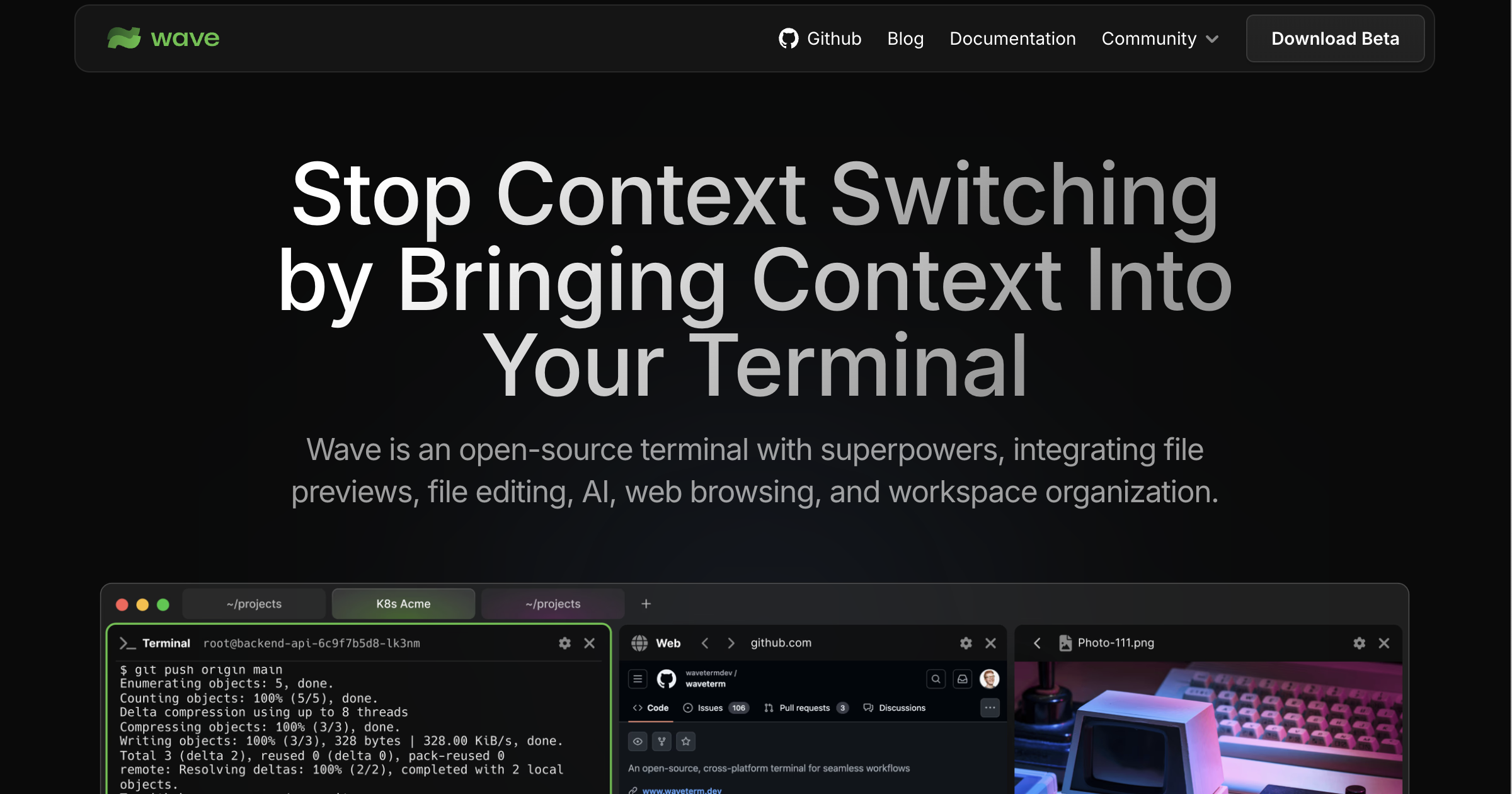
Wave Terminal is an open-source terminal emulator that treats the command line as a graphical interface. Instead of just rendering text, it allows you to open web browsers, preview Markdown files, and edit code using a built-in Monaco editor without leaving the application. It was built to solve the constant context-switching between the CLI and the browser.
The tool is cross-platform, supporting macOS, Linux, and Windows. It specifically targets the “micro-frustrations” of development, such as losing track of commands run on remote machines or struggling to visualize data like CSVs and images from a remote server.
⚙️ How We Tested Wave Terminal
We installed the free open-source version on macOS (M2) and utilized it for 14 days. During this time, we performed three core founder tasks: managing a remote Ubuntu server via SSH to update configuration files, analyzing a 50MB CSV data export without opening Excel, and using the built-in AI to debug a broken deployment script.
✨ Key Features (What Actually Stood Out)
Wave Terminal succeeds by making the terminal feel like a productivity hub rather than just a shell. The way it handles remote connections is noticeably smoother than standard SSH clients.
- Graphical Blocks — Every command exists in its own frame, which we found helpful for keeping build logs separate from active work.
- Unified History — The CMD + H shortcut searches through every command you have ever run, even on remote servers you are no longer connected to.
- Inline File Editing — We could open and edit a .env file on a remote server with full mouse support and syntax highlighting immediately.
- Integrated Web Browser — We opened GitHub inside a terminal block to check documentation while simultaneously running the code in the block next to it.
- WSH Shell Extensions — This small helper program lets you control the GUI blocks using command-line arguments, which is great for automating window layouts.
💰 Wave Terminal Pricing — Is It Worth It?
Wave Terminal is currently free and open-source under the Apache 2.0 license. There are no hidden tiers or usage limits on the core terminal features. This makes it a compelling choice for teams looking for coding tools that don’t require a monthly subscription like some commercial competitors.
| Plan | Price | Best For | Watch Out For |
| Open Source | $0 | Individual developers & founders | Electron-based memory usage |
Our pick: Open Source — Since it is the only version available, it provides all features like AI assistance and remote management for free.
🧪 What We Found During Testing
Setting up remote connections was the high point of our test. When we connected to our server, Wave offered to install Waveshell, which enabled us to use the file explorer and editor on the remote machine as if it were local. We were surprised that the terminal didn’t lag when scrolling through long log files, a common issue with some Electron apps.
A founder in our community who runs a software agency told us they switched to Wave primarily because the universal history means they never have to ask developers for specific deploy commands twice.
⚠️ Limitations We Found
- Resource Intensity — As of January 2025, it consumes significantly more RAM than native options like iTerm2 or Alacritty.
- Learning Curve — Navigating between blocks and workspaces requires learning a new set of keyboard shortcuts that differ from standard multiplexers like tmux.
- Beta Status — We encountered one occasion where a workspace failed to reload perfectly after a hard restart of the application.
⚔️ Wave Terminal vs Competitors
Wave competes directly with other modern terminal emulators that incorporate AI and graphical elements.
| Competitor | Pick it instead of Wave Terminal if… |
| Warp | You prefer a collaborative team environment and don’t mind a required cloud login. |
| iTerm2 | You want a classic, lightweight macOS experience without graphical blocks or Electron. |
| Tmux | You need a text-only multiplexer that runs entirely within the remote server shell. |
👍 Pros & Cons
| ✅ Pros | ❌ Cons |
| Beautiful Markdown and CSV rendering | Heavy memory usage for old hardware |
| Zero-config remote file editing | Some UI elements feel cluttered initially | Lack of some advanced legacy plugin support |
| Persistent sessions survive reboots | Workspace sync is strictly local for now |
🎯 Who Should Use Wave Terminal (And Who Shouldn’t)
✅ Use it if you:
- Frequently manage remote servers via SSH and hate switching to VS Code for quick edits.
- Analyze data outputs like CSVs or images directly from the command line.
- Want an AI-powered terminal without the privacy concerns of forced cloud logins.
❌ Skip it if you:
- Are a minimalist who wants the lowest possible latency and RAM usage; try Alacritty instead.
- Rely on a very specific set of third-party plugins only found in the Zsh ecosystem.
- Have an older laptop with less than 8GB of RAM available.
🛠️ Setup & Onboarding
Installation is straightforward via Homebrew or a direct download. Unlike most modern AI tools, there is no sign-up or email wall. The most important setup step is allowing the Waveshell install on your first remote connection, which takes about 10 seconds and unlocks the best features.
❓ Frequently Asked Questions
Does Wave Terminal require a login?
No, Wave is completely local and does not require an account or internet connection to function as a basic terminal.
Is Wave Terminal really open source?
Yes, it is licensed under Apache 2.0, and the source code is available on GitHub for anyone to audit or modify.
Can I use my own AI API keys?
Wave supports bringing your own keys for integrated AI features, meaning you only pay for what you use via providers like OpenAI or Anthropic.
How does it handle large files?
During our testing, the graphical preview handled 50MB CSV files smoothly, though text logs over 100,000 lines can occasionally slow the UI down.
Does it support Windows?
Yes, Wave provides a Windows installer and has specific features for managing WSL environments.
Is Wave better than Warp?
Wave is better if you value open-source and privacy; Warp is better if you want a more polished, collaborative team experience but don’t mind a cloud-first model.
Looking for more tools like this? See all coding tools we’ve reviewed →
Discover more from AI Founder Kit
Subscribe to get the latest posts sent to your email.