🚀 Quick Verdict
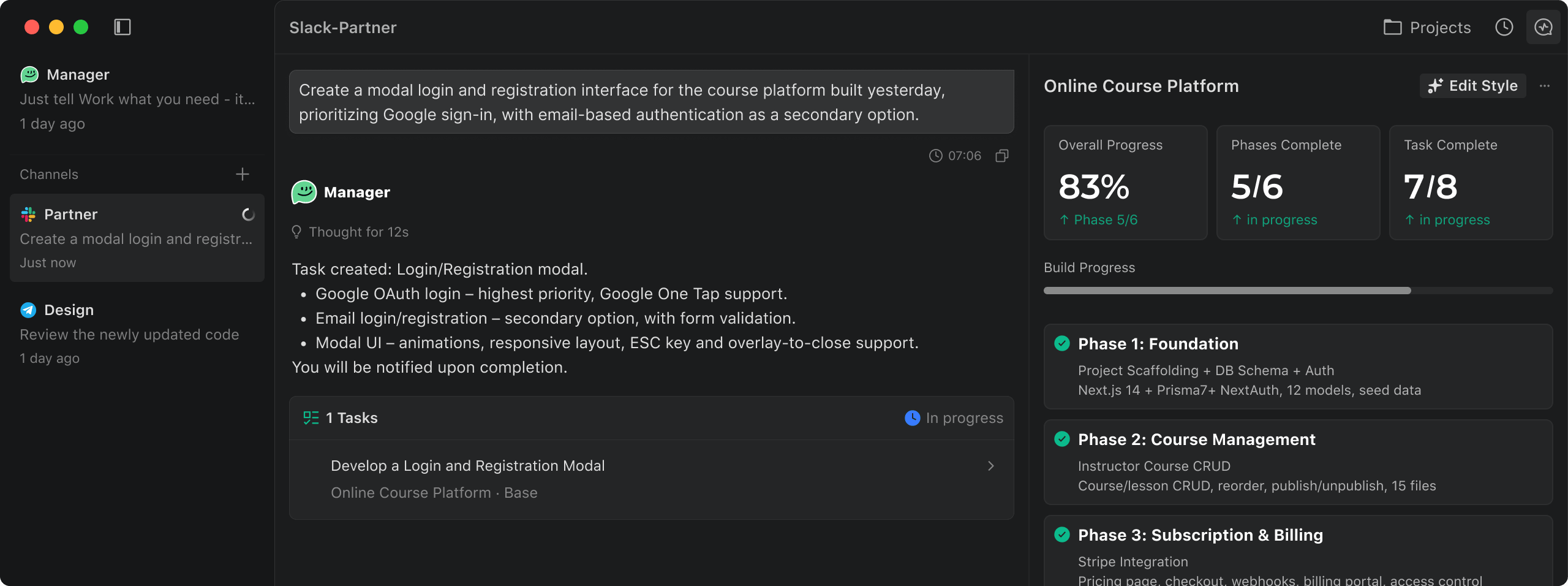
Verdent actually manages to run multiple engineering tasks at once without the context drift that kills most chat-based AI tools. We were surprised that it didn’t just write code but actually created its own test cases to verify the work before showing us a result. It feels less like a chatbot and more like a junior developer who actually follows instructions.
| Overall Score | 8.8/10 |
| Best For | Founders building complex web apps |
| Tested Plan | Free Trial |
| Testing Period | 21 days |
| Biggest Strength | Parallel agent workflows |
| Biggest Weakness | High resource usage on Desktop |
| Best Alternative | Cursor |
🤔 What Is Verdent?
Verdent is an AI-native coding partner designed to handle long-horizon software engineering tasks. Unlike simple autocomplete tools, it uses an agentic approach to plan, execute, and test code changes across your entire codebase simultaneously.
Built by a team in Singapore, the tool solves the problem of “AI fatigue” where users spend more time debugging AI output than writing it. It aims to act as a technical co-founder by managing the boring parts of implementation while you focus on the product architecture.
⚙️ How We Tested Verdent
We used the Verdent Desktop app and VS Code extension for three weeks on a live React/Node.js project. Our testing focused on three founder-level tasks: generating a complete user onboarding flow, refactoring a legacy database schema, and setting up automated Stripe webhook handlers.
✨ Key Features (What Actually Stood Out)
The tool treats coding as a series of automation tasks rather than just text generation. This shift in perspective makes it much more reliable for shipping actual features.
- Task-based Planning — Before writing code, it generates a markdown plan with subtasks. In our test, it caught a missing dependency on a database migration before we even hit ‘execute’.
- Parallel Agents — You can start three different features at once. We had it fixing CSS bugs in one tab while building a search filter in another, and neither task corrupted the other’s context.
- SEAlign Logic — This model training allows the AI to think like an engineer. It actually bothered to look at existing architectural patterns instead of just guessing the file structure.
- Episodic Memory — It remembers what you discussed three sessions ago. We didn’t have to re-explain our naming conventions for every new feature request.
- Integrated Terminal — It runs its own tests. When a unit test failed during an implementation, the agent automatically went back to fix the logic without asking us for help.
💰 Verdent Pricing — Is It Worth It?
Verdent is currently in a growth phase, offering a free trial to get users onboarded. While specific tiered pricing isn’t publicly listed as a fixed monthly cost yet, they allow for “Bring Your Own Key” (BYOK) which gives founders total control over their coding costs by paying only for what the LLM uses.
| Plan | Price | Best For | Watch Out For |
| Free Trial | $0 | New builders | Limited time offer |
| BYOK / Enterprise | Custom | Scaling startups | API costs can scale fast |
Our pick: Free Trial — It’s the best way to verify if their agentic workflow fits your specific tech stack before committing to an enterprise setup.
🧪 What We Found During Testing
The multi-agent workflow is the real deal. We kicked off a task to “Add social login” and then immediately started a “Dark mode toggle” task. Most tools would lose the thread, but Verdent partitioned the work into separate git-worktrees. The most impressive moment was when it realized our social login required a database change and automatically waited for the schema update to finish before writing the frontend logic. It didn’t hallucinate the database fields; it actually read the migration file it had just created.
A founder in our community who runs a SaaS startup told us Verdent worked miracles in getting their app from a prototype to a fully functional version by handling all the backend boilerplate they didn’t have time to write.
⚠️ Limitations We Found
- Hardware Heavy — As of early 2026, the desktop app consumes significant RAM when running multiple tasks, which might slow down older laptops.
- Onboarding Friction — Users behind strict corporate firewalls will need to manually whitelist several domains like api.verdent.ai to get the agents to connect.
- Initial Setup — Indexing a large legacy codebase for the first time takes a while before the memory features become effective.
⚔️ Verdent vs Competitors
Founders usually choose between a smart editor and a full agentic system. Here is how it stacks up.
| Competitor | Pick it instead of Verdent if… |
| Cursor | You want a familiar VS Code experience without the complex agent orchestration. |
| GitHub Copilot | You only need autocomplete and don’t want the AI to manage entire tasks or tests. |
| Replit | You are building entirely in the browser and don’t want a local desktop environment. |
👍 Pros & Cons
| ✅ Pros | ❌ Cons |
| Truly handles parallel coding tasks | Requires whitelisting for corporate setups | Desktop app can be resource-intensive | No fixed public monthly pricing yet | Learning curve for ‘Plan Mode’ editor |
🎯 Who Should Use Verdent (And Who Shouldn’t)
✅ Use it if you:
- Are a solo founder who needs to build complex features quickly across the whole stack.
- Hate micromanaging AI and want the tool to test its own output.
- Need to manage multiple development tasks simultaneously without switching contexts.
❌ Skip it if you:
- Only need simple code completions — stick to GitHub Copilot instead.
- Have a very low-spec computer that struggles with heavy local applications.
- Are working on a simple one-page site where agentic planning is overkill.
🔐 Data & Privacy
Verdent uses sub-processors like Parallel.ai and Jina for web search and content parsing. However, they provide clear whitelisting documentation and a standard security policy that covers their API and desktop endpoints. You can find more detail in their security policy.
❓ Frequently Asked Questions
Does Verdent work with my existing IDE?
Yes, it has native extensions for both VS Code and JetBrains, plus a standalone Desktop app called Verdent Deck.
Can it really code and test at the same time?
Yes, the agents are designed to write code, generate test cases, and execute those tests in your local environment to verify fixes.
What makes it different from cursor?
Verdent focuses on parallel agent workflows and specific planning modes, whereas Cursor is primarily a modified editor focused on chat-driven changes.
Do I need to pay for my own LLM keys?
Verdent supports a BYOK (Bring Your Own Key) model so you can use your own subscriptions for more control over costs.
Is there a free version of Verdent?
There is a limited-time free trial that allows you to test the full agentic capabilities of the platform.
How does it handle codebase context?
It uses a three-tier memory system including episodic and semantic memory to remember your project architecture and prior decisions.
Looking for more tools like this? See all coding tools we’ve reviewed →
Discover more from AI Founder Kit
Subscribe to get the latest posts sent to your email.