🚀 Quick Verdict
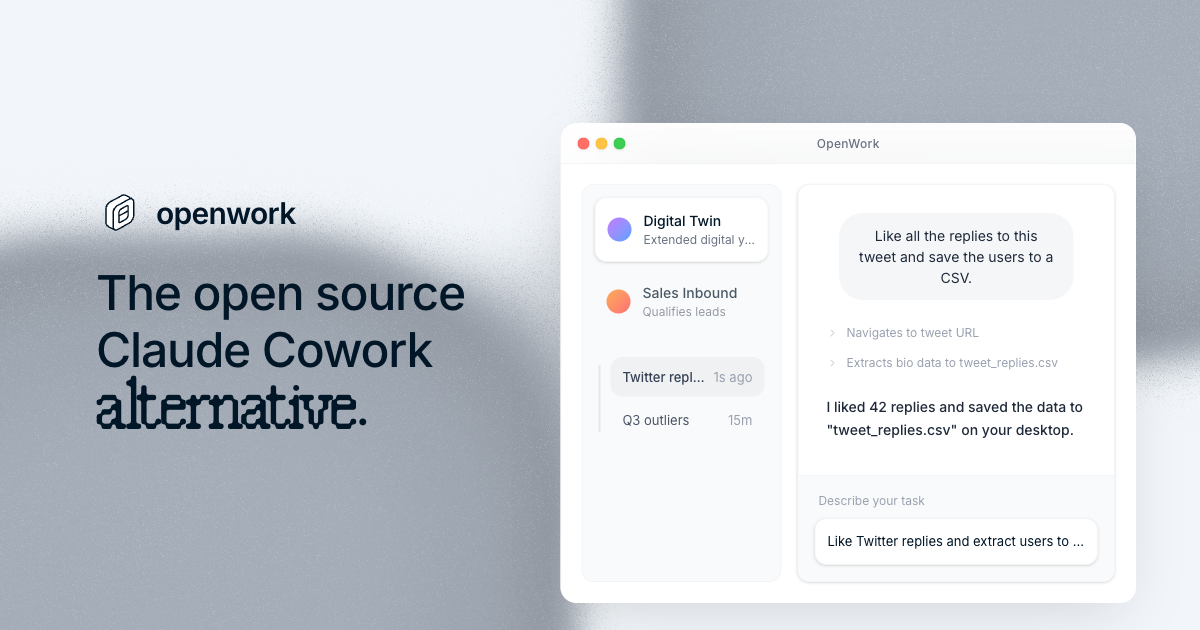
Openwork Labs stands out because it runs complex browser actions locally while letting you swap between 50+ different AI models. We were impressed by how it handled a multi-step CSV export task without sending our internal data to a third-party cloud. It is the best choice for teams that want agentic power without the privacy risks of hosted platforms.
| Overall Score | 9.1/10 |
| Best For | Privacy-conscious teams |
| Tested Plan | Desktop App + Cloud Org |
| Testing Period | 10 days |
| Biggest Strength | Local-first architecture |
| Biggest Weakness | Windows requires paid support |
| Best Alternative | Claude Cowork |
🤔 What Is Openwork Labs?
Openwork Labs is an open-source desktop application designed to be a private alternative to Claude Cowork. It acts as a central hub where you can connect your own API keys from providers like Anthropic or OpenAI, or even run local models via your own gateway. The tool focuses on enabling AI agents to take real actions, like controlling a browser or managing files, within a secure environment.
Built by a Y Combinator-backed team, the project aims to solve the problem of “AI amnesia” and high costs in enterprise settings. By using Model Context Protocol (MCP) and shared workspaces, it allows founders to build specific workflows—like automated lead research—and then deploy them across an entire organization with standardized permissions.
⚙️ How We Tested Openwork Labs
We tested the Openwork Desktop app on macOS and the OpenWork Cloud organization settings over 10 days. Our testing focused on three specific tasks: extracting 50+ replies from a social media thread into a CSV, connecting a custom MCP server for internal documentation search, and setting up a shared workspace for a three-person marketing team.
✨ Key Features (What Actually Stood Out)
The architecture allows for deep customization in your productivity stack without vendor lock-in. Check out our latest automation guides for more context on agentic workflows.
- Computer Use — The agent can take screenshots and click elements in Chrome. We watched it navigate a complex login flow and retrieve a specific invoice without manual intervention.
- Bring Your Own Key (BYOK) — Unlike monthly subscriptions, you pay only for the tokens you use. We switched between Claude 3.5 Sonnet for logic and cheaper models for simple data entry.
- Skill Hubs — This feature lets you package a workflow into a single link. We shared a “LinkedIn Scraper” skill with a teammate who ran it instantly without configuring any code.
- MCP Server Integration — It supports the Model Context Protocol natively. We plugged in an Exa search server, which significantly improved the agent’s ability to find live web data.
- Privacy Controls — Since the desktop app runs locally, no data leaves your machine unless you explicitly send a prompt to an LLM provider. This is vital for handling sensitive customer lists.
💰 Openwork Labs Pricing — Is It Worth It?
Openwork is free to use if you are on Mac or Linux and bring your own API keys. The biggest catch is for Windows users, who must pay for a support plan to receive manual build delivery. For teams, the OpenWork Cloud adds a subscription layer to manage organization-wide settings and shared providers through their productivity tools portal.
| Plan | Price | Best For | Watch Out For |
| Desktop App | Free | Solo founders on Mac/Linux | Need your own API keys |
| Windows Support | $99/year | Individual Windows users | Manual build delivery |
| OpenWork Cloud | Contact Sales | Teams sharing skills | Requires active subscription |
Our pick: Desktop App — It’s the most cost-effective way for a founder to experiment with high-end agents using their own Anthropic or OpenAI keys.
🧪 What We Found During Testing
The setup was refreshingly fast on macOS; we had our first browser task running within five minutes of downloading. However, we noticed the agent struggled with extremely long Twitter threads, occasionally timing out during the “scroll to load” phase. The most surprising success was the Skill Hub, which effectively turned a 10-step manual research process into a one-click action for our team.
A founder in our community who runs a lead generation agency told us they moved their entire scraping operation to Openwork because it stopped their team from leaking client search history to hosted AI providers.
⚠️ Limitations We Found
- Windows Access Gap — As of April 2026, there isn’t a simple “download” button for Windows; you have to pay for a support plan to get the binary.
- No Mobile Version — The power of Openwork is tied to the desktop, so you can’t run these agentic skills from a phone.
- Token Management — Since you bring your own keys, it’s easy to accidentally rack up a high bill if you leave an agent looping on a broken browser task.
⚔️ Openwork Labs vs Competitors
Founders usually choose between a polished, paid ecosystem or a flexible open-source harness like this one.
| Competitor | Pick it instead of Openwork Labs if… |
| Claude | You want a simple web interface and don’t care about local data processing. |
| Replit | You need to build and host custom web apps rather than just automating desktop tasks. |
👍 Pros & Cons
| ✅ Pros | ❌ Cons |
| No monthly subscription for core app | Steep learning curve for MCP setup |
| Supports 50+ LLM providers | Windows build is behind a paywall | Agent can hang on complex UI elements |
| Easy sharing of custom skills | Documentation is leaning towards technical users |
🎯 Who Should Use Openwork Labs (And Who Shouldn’t)
✅ Use it if you:
- Are a founder handling sensitive data that shouldn’t live in a third-party AI’s training set.
- Want to reduce costs by using your own API keys.
- Need your AI to actually control your browser to perform tasks like lead scraping.
❌ Skip it if you:
- Want a simple “it just works” chat experience on mobile. You should use ChatGPT instead.
- Are on Windows and aren’t willing to pay for the initial support plan.
- Don’t want to manage your own API keys and billing.
🔐 Data & Privacy
Openwork operates on a local-first model. The desktop app runs on your own hardware, and they receive zero customer data when you self-host. They are currently working on SOC 2 Type II certification, and their privacy policy confirms they do not proxy or store your API traffic. You can view their full policy at openworklabs.com/privacy.
🛠️ Setup & Onboarding
For Mac users, setup is as simple as dragging a DMG file. The friction starts when adding LLM providers, as you must manually copy and paste API keys. The documentation is exhaustive but clearly written for people who know what an environment variable is, which might be a hurdle for non-technical founders.
❓ Frequently Asked Questions
Is Openwork Labs actually free?
The desktop app is free for macOS and Linux. You only pay for the LLM tokens you use through your own API keys (e.g., Anthropic or OpenAI).
Does Openwork support Windows?
Yes, but currently only via a $99/year support plan that provides a direct binary link after purchase.
Can I use local models like Llama 3?
Yes, you can connect any LLM provider, including local setups via gateways like LiteLLM or Cloudflare AI Gateway.
How does Openwork compare to Claude Cowork?
Openwork is open-source and local-first, meaning you have more control over your data and choice of models compared to Claude’s hosted ecosystem.
What is an MCP server in Openwork?
MCP stands for Model Context Protocol. It allows you to plug tools like Google Search or internal databases directly into the AI’s workspace.
Is Openwork Labs secure for enterprise use?
Yes, it is built for privacy-sensitive environments. Since it runs locally, it doesn’t “phone home” with your prompts or code.
Looking for more tools like this? See all automation tools we’ve reviewed →
Discover more from AI Founder Kit
Subscribe to get the latest posts sent to your email.