🚀 Quick Verdict
It’s the only tool we’ve found that prevents a coding agent from accidentally deleting your home directory thanks to its use of isolated containers. The ability to fork a conversation when an agent goes off-track saved us from wasting tokens on broken context. It’s essential if you’re tired of waiting for one AI task to finish before starting the next.
| Overall Score | 8.8/10 |
| Best For | Founders managing complex refactors |
| Tested Plan | Beta (Free) |
| Testing Period | 7 days |
| Biggest Strength | Safe container isolation |
| Biggest Weakness | Requires local Docker setup |
| Best Alternative | Cursor |
🤔 What Is Imbue Sculptor?
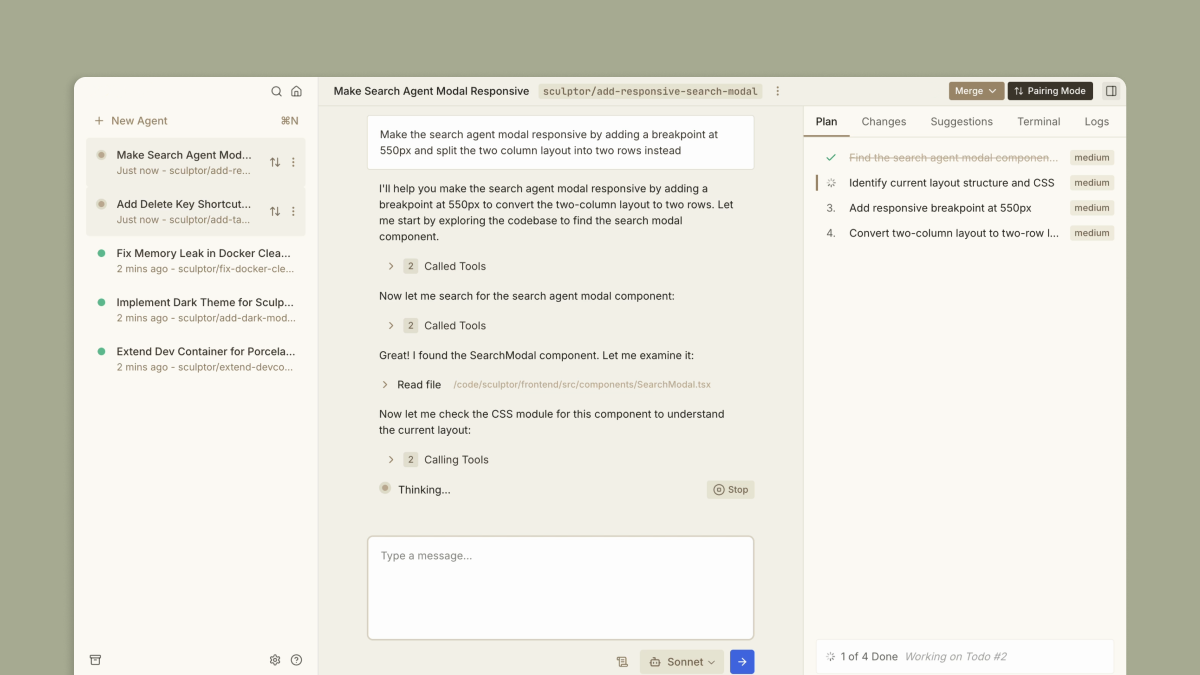
Imbue Sculptor is a desktop environment designed specifically to host AI coding agents like Claude Code. Instead of letting an agent run wild on your local machine, it puts every agent in a separate Docker container where they can execute code and run tests without affecting your main system.
Built by the team at Imbue, it solves the chaos of multi-agent development. It allow you to spin up three different agents to tackle three different bugs at the same time, then merge only the results that actually work into your main codebase.
⚙️ How We Tested Imbue Sculptor
We used the free beta version for one week, connecting our own OpenAI and Anthropic API keys. We tasked it with three founder-level jobs: refactoring a landing page’s CSS architecture, adding Clerk authentication to a prototype, and running parallel tests on a Spotify API integration. We focused on how well it handled sync issues between the container and our local VS Code setup.
✨ Key Features (What Actually Stood Out)
The interface feels more like a command center for engineers than just another chat box. It’s built for coding workflows where context matters more than speed.
- Pairing Mode — This bidirectionally syncs the agent’s container files with your local IDE so you can edit alongside the AI in real time.
- Forking — When an agent started hallucinating during our auth setup, we just reverted to a previous state and branched off a new agent to try a different path.
- Instruction Audits — We set a rule to never use certain libraries, and Sculptor flagged the agent immediately when it tried to install them.
- Safe Containers — Since it uses your Dockerfile, the agent works in an environment that exactly matches your production settings.
- Parallel Execution — We ran four separate agents on a single repo without the dependency conflicts usually found in git worktrees.
💰 Imbue Sculptor Pricing — Is It Worth It?
Currently, the tool itself is free while in beta, which makes it a steal for high-level development. You still have to pay for your own LLM usage via API keys, but the productivity gains from running agents in parallel outweigh the minor cost of context caching.
| Plan | Price | Best For | Watch Out For |
| Beta | $0 | Early adopters | Requires own API keys |
Our pick: Beta — It’s free and fully featured, supporting the latest models like Claude 3.5 Sonnet and Codex.
🧪 What We Found During Testing
The setup was surprisingly smooth, but you must have Docker running in the background or the app won’t boot its agents. We loved the specific moment we tried to merge a large refactor; instead of a messy git conflict, Sculptor’s UI let us pick and choose lines to keep with a single click. One agent failed to install a specific dependency, but because it was in a container, it didn’t mess up our local terminal or environment variables.
A founder in our community who runs a software agency told us Sculptor is the best way to keep multiple coding tasks moving without getting stuck in a single-threaded conversation window.
⚠️ Limitations We Found
- Docker Dependency — As of late 2024, if Docker Desktop crashes, your entire Sculptor session hangs without much warning.
- Model Support — While it supports Claude and OpenAI, it isn’t as flexible as some generic wrappers if you want to use local models via Ollama.
- Beta Stability — We noticed occasional sync lag in Pairing Mode when working on repositories with over 10,000 files.
⚔️ Imbue Sculptor vs Competitors
Most people compare this to standard AI code editors, but Sculptor is more of an agent-orchestrator than a simple text editor.
| Competitor | Pick it instead of Imbue Sculptor if… |
| Cursor | You want an all-in-one IDE experience without managing containers. |
| Lovable | You are building a full-stack app from scratch and want a superhuman engineer to handle deployment. |
| Claude Code | You prefer a raw CLI interface and don’t mind running agents directly on your hardware. |
👍 Pros & Cons
| ✅ Pros | ❌ Cons |
| Safe, isolated code execution | Higher memory usage due to Docker |
| Parallel multi-tasking works well | Steeper learning curve than Cursor | Requires separate API subscriptions |
| Clean UI for complex diffs | No mobile or web access |
🎯 Who Should Use Imbue Sculptor (And Who Shouldn’t)
✅ Use it if you:
- Are a technical founder managing a large codebase who needs to run multiple AI tasks at once.
- Are worried about AI agents making destructive changes to your local file system.
- Want to test different architectural approaches to the same problem simultaneously.
❌ Skip it if you:
- Want a simple chat-to-code interface without managing local infrastructure; use Cursor instead.
- Are a non-technical founder who doesn’t have Docker installed or know how to use an IDE.
- Only need help writing short snippets of code rather than full project refactors.
❓ Frequently Asked Questions
Is Imbue Sculptor free?
Yes, the desktop app is currently free during its beta period, though you provide your own LLM API keys.
Does it support GPT-4o?
Yes, Sculptor supports the latest models from OpenAI and Anthropic, including Claude 3.5 Sonnet and Opus.
What is Sculptor Pairing Mode?
It’s a feature that allows the AI agent in the container to sync its work directly to your local VS Code or IDE.
Do I need Docker for Imbue Sculptor?
Yes, Sculptor requires Docker to create the isolated environments where its coding agents run and test code.
Can Sculptor handle merge conflicts?
Yes, it includes a visual merge tool specifically designed to help you resolve conflicts when parallel agents change the same files.
Is it safer than Claude Code?
Yes, because it runs inside a container, preventing the agent from accessing or deleting files outside of your project directory.
Looking for more tools like this? See all coding tools we’ve reviewed →
Discover more from AI Founder Kit
Subscribe to get the latest posts sent to your email.