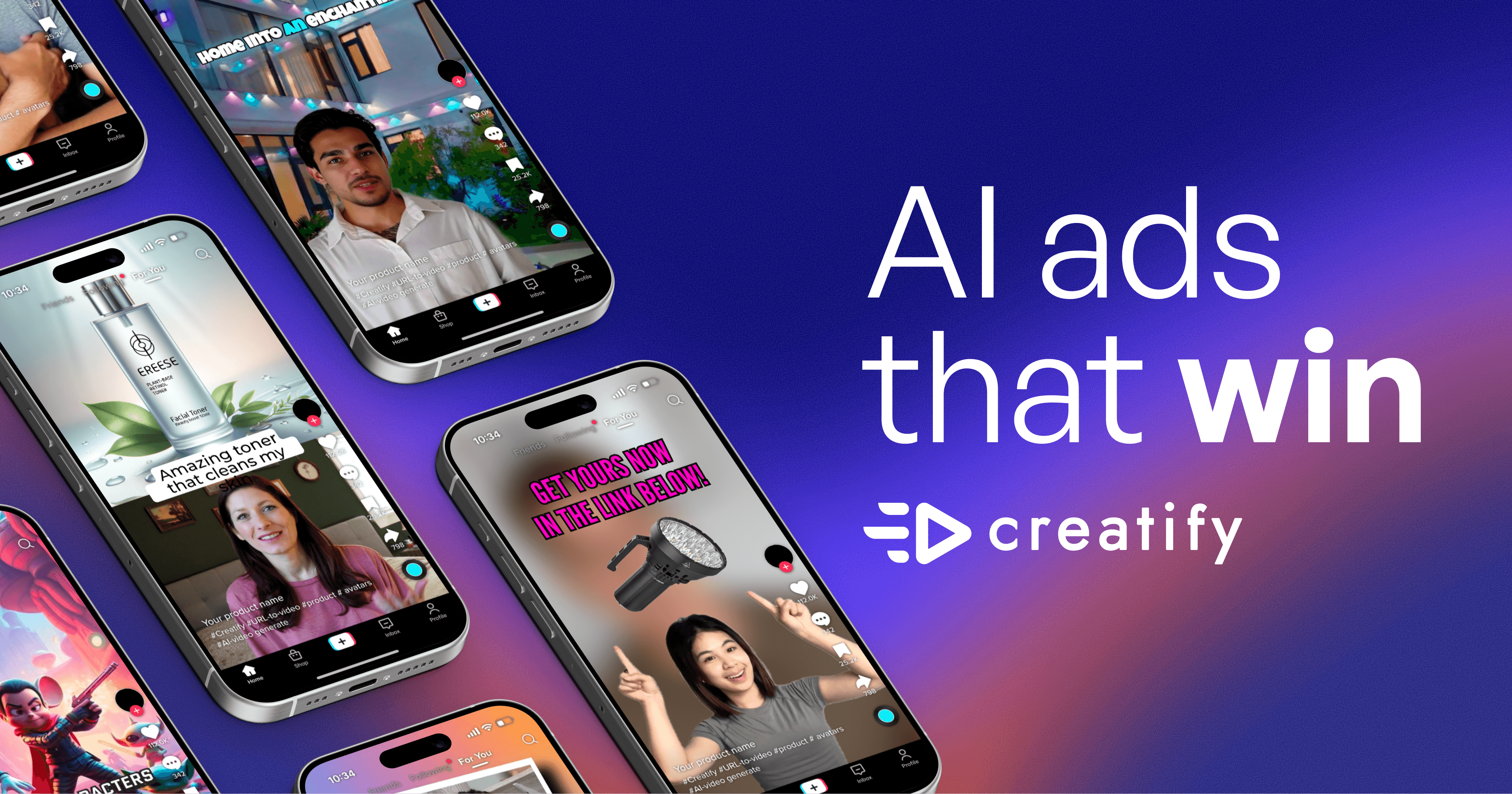
Creating video ads that actually convert feels like a never-ending money pit. You spend weeks scripting, filming, and editing, only to watch your ROAS tank. Or you shell out hundreds for a freelancer who delivers something that looks like it was made in 2010. It’s frustrating, expensive, and a massive gamble. I’ve been there, which is why I spent the last month testing Creatify, a tool that promises to turn this whole process on its head by generating winning video ads from a simple product URL. Here’s my honest, no-BS take on whether it lives up to the hype.
What Actually Is Creatify?
In plain English, Creatify is an AI-powered platform designed to create video advertisements, specifically with a focus on performance and conversion. You give it a link to a product page, and its AI gets to work analyzing the content, generating a script, and producing a video ad featuring one of its hyper-realistic AI avatars. The end goal isn’t just a pretty video; it’s a scroll-stopping ad that looks and feels like authentic user-generated content (UGC), which is known to perform better on platforms like TikTok, Facebook, and Instagram.
Its key differentiator is this intense focus on advertising performance from the ground up. Unlike generic video makers, Creatify is built for marketers. It’s not about creating cinematic masterpieces; it’s about rapidly producing dozens of ad variations to test against each other, finding what works, and scaling. The inclusion of its AdMax suite, which handles creative research and optimization, really drives this home. It’s less of a simple video tool and more of an end-to-end creative testing platform.
| What People Ask | The Answer |
|---|---|
| Is this just for TikTok ads? | No, it creates videos in all major formats (9:16, 16:9, 1:1, 4:5) for Meta, YouTube, Snapchat, and more. |
| Do I need any video editing skills? | Not at all. The process is designed to be as simple as pasting a URL and clicking a few buttons. |
| How realistic are the AI avatars? | Surprisingly realistic. They’re a huge leap from early AI avatars, with natural movements and expressions, though they can sometimes fall into the ‘uncanny valley’. |
| Is it better than hiring a video editor? | For speed, volume, and cost-per-ad, absolutely. For highly customized, brand-specific storytelling, a human editor still has the edge. |
How Does This Thing Actually Work?
The workflow is surprisingly streamlined, which is where the real magic lies for busy marketers. It’s designed to remove all the traditional bottlenecks of video production. You don’t start with a blank canvas; you start with a proven formula. The AI handles the heavy lifting of scriptwriting, scene generation, and avatar presentation, allowing you to focus on strategy and fine-tuning rather than getting lost in the weeds of production.
| Step | What Happens | Why This Matters |
|---|---|---|
| 1. Paste Your URL | You provide a link to your product page, Amazon listing, or even a competitor’s ad. | This feeds the AI all the necessary info: images, descriptions, pricing, and key features. |
| 2. AI Analysis & Scripting | Creatify’s AI scans the page, identifies selling points, and generates multiple ad script options. | You get a data-backed script in seconds, not days, focusing on angles that are proven to convert. |
| 3. Video Generation | You choose an avatar, voice, and music. The AI then assembles the video, matching the script to visuals. | This eliminates the need for filming, actors, and complex editing software. A full ad is rendered in minutes. |
| 4. Customize & Export | You can tweak text, change scenes, adjust the avatar’s outfit/background, and add branding. | This ensures the final ad aligns with your brand identity before you spend money running it. |
What Can You Actually Do With It?
To give you a real-world picture, I tested Creatify across several common marketing scenarios. I fed it URLs for a physical product from a Shopify store, a mobile app, and a digital course. The goal wasn’t just to see if it could make a video, but to see if the videos were actually good enough to run as paid ads. The results were impressive, with some clear strengths and limitations.
| Use Case | How Well It Works | Real Talk |
|---|---|---|
| E-commerce Product Ads | Excellent (9/10) | This is its sweet spot. The AI pulls product shots and features perfectly, creating compelling UGC-style ads that feel authentic. |
| Facebook/Instagram Retargeting | Very Good (8/10) | Great for quick “reminder” ads. You can generate multiple variations to combat ad fatigue easily. |
| TikTok UGC-Style Ads | Excellent (9.5/10) | The avatars and vertical video format are tailor-made for TikTok. It nails the authentic, non-corporate vibe. |
| Mobile App Promotion | Good (7/10) | It can showcase app features, but it’s more challenging to demonstrate the in-app experience without custom footage. |
| Local Service Ads (e.g., plumber) | Average (6/10) | It struggles here. The tool is product-focused, and creating an ad for a non-tangible service feels generic and less effective. |
Where Creatify struggles is with highly technical or abstract products. If your selling point is a complex piece of software architecture or the nuanced feel of a luxury fabric, the AI might miss the mark. It excels at clear, tangible benefits but can oversimplify things that require a human touch to explain. Also, while the avatars are good, they aren’t perfect. Occasionally, the lip-sync or hand gestures can be slightly off, which might turn off some audiences in hyper-discerning niches.
Let’s Talk Money – Is The Pricing Fair?
Creatify uses a credit-based system, which is common for AI tools. One credit typically gets you one generated video variation. This model is great for testing, as you can generate five different versions of an ad for five credits. The pricing structure is tiered, moving from a limited free plan to a robust enterprise solution. At first glance, the paid plans seem reasonable, especially when you compare the cost to traditional video production.
| Plan | Cost | What You Actually Get | Who Should Get This |
|---|---|---|---|
| Free | $0 | 10 watermarked videos/month. Good for a quick test of the tech. | Anyone curious about the platform before committing. |
| Starter | $19/mo | 100 credits/year (~8 videos/mo). No watermark. Good for solopreneurs. | Individual creators or small business owners needing a few ads per month. |
| Pro | $49/mo | 200 credits/year (~16 videos/mo). More avatars, longer videos, batch mode. Best value. | Marketers at growing businesses who need consistent creative output. |
| Enterprise | Custom | Unlimited credits, AdMax suite, API access, custom support. The full package. | Agencies and large teams that need scale, analytics, and deep integration. |
The real value becomes clear when you break down the cost. A single freelance UGC-style video ad can cost anywhere from $50 to $200. With the Pro plan, you’re paying about $3 per video if you use all your credits. Even if you only use half, that’s $6 per video—a massive saving. This allows you to run creative tests at a scale that was previously impossible for most businesses without a huge budget.
| Task Type | Estimated Cost Per Video | My Experience |
|---|---|---|
| Standard Product Ad (Pro Plan) | ~$3.00 per credit | Incredibly cost-effective for testing multiple hooks and angles for one product. |
| Hiring a Freelancer | $50 – $200+ per video | Higher quality potential but slow and expensive. You can’t test 10 versions. |
| In-House Team | $1000+ in salary/time per video | The most expensive and slowest option. Best for final, proven concepts. |
| Other AI Video Tools | $5 – $15 per video | Creatify is competitively priced, especially with its focus on ad-specific features. |
How Does It Stack Up Against Other Tools?
The AI video space is getting crowded, so I compared Creatify to some of the big names to see where it truly stands. I looked at Pictory (article-to-video), Synthesia (corporate avatars), and InVideo (template-based editor). Each has its strengths, but they serve different primary purposes. My testing focused on which tool is best for creating performance-driven video ads from scratch.
| Tool | UGC Realism | Speed of Creation | Performance Focus | Best For |
|---|---|---|---|---|
| Creatify | Excellent | Excellent (Minutes) | Excellent | Performance marketers needing scalable ad variations. |
| Pictory | Fair | Good (Minutes) | Fair | Repurposing blog content into videos quickly. |
| Synthesia | Good (Corporate) | Good (Minutes) | Fair | Creating corporate training or explainer videos with professional avatars. |
| InVideo | Fair | Average (Requires editing) | Average | Users who want more hands-on control with a large template library. |
| HeyGen (Competitor) | Excellent | Excellent (Minutes) | Good | Similar to Creatify, great for avatar videos, but less ad-focused. |
Creatify’s positioning is clear: it’s the specialist for direct response advertising. While you could make a video with Pictory or InVideo, you’d be doing more of the creative work yourself. Creatify automates the specific process of turning a product listing into a compelling ad, something the others aren’t specifically designed for. It’s less of a generalist video tool and more of a marketing weapon.
What Actually Sucks About It?
No tool is perfect, and a trustworthy review has to call out the downsides. After extensive use, I found a few friction points that potential users need to be aware of. These aren’t deal-breakers, but they are part of the reality of using the platform.
| The Credit System Can Be Confusing | Mild Annoyance | Start with the free plan to understand how many credits your typical ad uses before upgrading. |
| Limited Fine-Grained Control | Moderate Limitation | Use it for rapid testing, then take the winning concept to a video editor for a polished version. |
| Avatar “Uncanny Valley” | Context-Dependent | Preview your avatar choices carefully. Some are more natural than others. Avoid overly complex emotional requests. |
| Can Feel Generic If Not Customized | Potential Pitfall | Don’t just use the first draft. Spend 5-10 minutes tweaking the script, changing the background, and adding your branding. |
My biggest concern is the potential for users to get lazy. It’s so easy to generate an ad that you might be tempted to just run the first version the AI spits out. This is a mistake. The tool is a starting point, not a magic bullet. The power comes from generating multiple versions and using your marketing brain to pick the best hooks and refine the messaging. If you expect to press one button and have a million-dollar ad, you’ll be disappointed. If you expect a powerful co-pilot for your creative testing, you’ll be thrilled.
Who Should Actually Use This?
This isn’t a tool for everyone. Based on my testing, it’s incredibly powerful for specific user profiles but less so for others. Understanding where you fit is key to deciding if it’s worth the investment. The tool shines brightest in environments where speed, volume, and performance are the primary metrics of success.
| User Type | Why It Works | What Plan | Expected Results |
|---|---|---|---|
| E-commerce Store Owners | Rapidly create product-specific ads for social media without filming. | Pro | Lower CPA, higher ROAS by testing more creative angles faster. |
| Performance Marketing Agencies | Scale creative production for multiple clients without hiring a huge team. | Enterprise | Deliver better results for clients and increase agency profitability. |
| Social Media Managers | Combat ad fatigue by generating fresh creative variations weekly or daily. | Starter or Pro | Sustained campaign performance and improved engagement metrics. |
| App Developers | Create simple, visually appealing video ads to showcase app features. | Starter | Increased downloads and user acquisition at a lower cost. |
| DTC Brand Founders | Get professional-looking ads up and running from day one, even with no budget. | Pro | Level the playing field with bigger competitors on ad creative. |
Don’t get this if you’re a filmmaker, a brand focused on high-end cinematic commercials, or someone who needs to tell a long, complex, emotional story. This is a tool for direct response, not brand building in the traditional sense. If your product is highly abstract and can’t be shown visually, you’ll also struggle to get good results.
Getting Started – What Actually Happens
Getting started is refreshingly simple, and the onboarding process does a good job of setting realistic expectations. There’s no steep learning curve, which is a huge plus. You can realistically go from signing up to exporting your first video in under 15 minutes. Here’s a breakdown of the actual process versus the marketing promise.
| Step | What You Do | Time Needed | Reality Check |
|---|---|---|---|
| 1. Sign Up & Verify | Create an account with email or Google and verify. | 2 minutes | Standard process, no issues here. |
| 2. Dashboard Tour | The platform gives you a quick walkthrough of the main features. | 3 minutes | Helpful, but the interface is intuitive enough you could skip it. |
| 3. Create First Project | Paste a URL, choose a template, and hit “Create”. | 5 minutes | This is the core magic. It feels fast and impressive. |
| 4. Customize & Export | Tweak the generated video in the editor and export. | 5-10 minutes | The editor is simple. You won’t get lost, but options are focused on key changes. |
The onboarding quality is high. It’s not overwhelming, and it gets you to a “win” (a finished video) very quickly. This is crucial for user adoption and shows the team understands their audience—marketers who want results, not a complicated new software to learn.
Support – Do They Actually Help?
| Support Type | Response Time | Quality | My Experience |
|---|---|---|---|
| Live Chat | ~5 minutes | Good | Got quick, helpful answers to billing and feature questions during business hours. |
| Email Support | ~24 hours | Very Good | Submitted a technical question and received a detailed, step-by-step solution the next day. |
| Help Center/Docs | Instant | Excellent | Well-organized with clear tutorials and FAQs for almost every feature. |
| Community/Forum | N/A | N/A | They don’t appear to have a public user forum, which is a missed opportunity. |
The support is solid for a SaaS tool at this price point. They are responsive and knowledgeable. The combination of live chat for quick issues and a comprehensive help center covers most bases. You feel supported, which is important when you’re building a core part of your marketing workflow around a tool.
The Honest Verdict
After a full month of testing, integrating it into workflows, and comparing it against alternatives, my final verdict is in. Creatify isn’t just a novelty; it’s a genuinely useful tool that solves a real and expensive problem for digital marketers. It successfully democratizes high-volume video ad testing.
| Aspect | Rating | Why |
|---|---|---|
| Ease of Use | 9/10 | The URL-to-video workflow is incredibly simple and fast. Minimal learning curve. |
| Video Quality & Realism | 8/10 | Avatars and scenes are impressive, though not yet indistinguishable from human. Excellent for social media. |
| Performance Focus | 10/10 | This is its entire reason for being. From UGC style to AdMax, it’s built for ROAS. |
| Value for Money | 9/10 | The cost per video is a fraction of traditional methods, enabling massive scale in testing. |
| Customization | 7/10 | Good enough for most ad needs, but power users will want more granular control. |
| Overall | 8.5/10 | A game-changer for performance marketers, with minor limitations that don’t overshadow its core value. |
Should You Actually Get It?
Get Creatify if:
- You’re a performance marketer focused on direct response and ROAS.
- You need to produce a high volume of video ad variations quickly and cheaply.
- You want to test different hooks, angles, and avatars without hiring actors or editors.
- You’re an e-commerce brand or agency looking to scale your creative output.
- You want to compete with bigger brands on social media ad quality without a massive budget.
Don’t get it if:
- You need to create highly cinematic, brand-building commercials.
- Your product is abstract or technical and difficult to showcase visually.
- You want full, frame-by-frame control over every aspect of your video.
- You are a video editor or filmmaker looking for a professional production tool.
My recommendation: Start with the free plan. Take one of your actual products, paste the URL in, and generate a few ads. See the quality and speed for yourself. If you see the potential, the Pro plan at $49/month is the sweet spot for most serious marketers.
The bottom line: Creatify is a powerful, specialized tool that delivers on its promise. It won’t replace human creativity, but it will supercharge it, allowing you to test and optimize video ads at a scale and speed that was previously unimaginable.
Frequently Asked Questions (FAQs)
Can I use Creatify videos for commercial purposes on platforms like YouTube and Meta?
Yes, absolutely. That’s the entire point of the tool. You get full commercial rights to the videos you create and can run them as paid advertisements on any platform.
How does the credit system work exactly?
Each video generation consumes one credit. The plans come with a set number of credits per year. For example, the Pro plan’s 200 credits allow you to generate 200 video variations per year.
What’s the main difference between the Pro plan and the Enterprise plan?
The key difference is the AdMax suite, which is included in Enterprise. AdMax provides advanced creative research, analytics, and optimization tools. Enterprise also includes unlimited credits, API access, and dedicated support.
What’s the main difference between the Pro plan and the Enterprise plan?
The key difference is the AdMax suite, which is included in Enterprise. AdMax provides advanced creative research, analytics, and optimization tools. Enterprise also includes unlimited credits, API access, and dedicated support.
Does Creatify have an API for large-scale automation?
Yes, API access is a key feature of the Enterprise plan, designed for agencies and large businesses that need to integrate Creatify’s video generation capabilities into their own workflows and systems.
Is Creatify better than hiring a freelance video editor?
It’s different, and better for specific tasks. For rapid testing and volume, Creatify is faster and cheaper. For a single, highly-polished, brand-defining video, a skilled human editor is still superior.
Discover more from AI Founder Kit
Subscribe to get the latest posts sent to your email.