🚀 Quick Verdict
We built a functional puzzle app in 10 minutes. The App Store submission bypasses the usual Xcode headache. It’s the fastest way to get a React Native project running without a developer.
| Overall Score | 8.5/10 |
| Best For | Indie founders |
| Tested Plan | Free Plan ($0) |
| Testing Period | 7 days |
| Biggest Strength | Cloud-based publishing |
| Biggest Weakness | Hidden pricing |
| Best Alternative | FlutterFlow |
🤔 What Is a0?
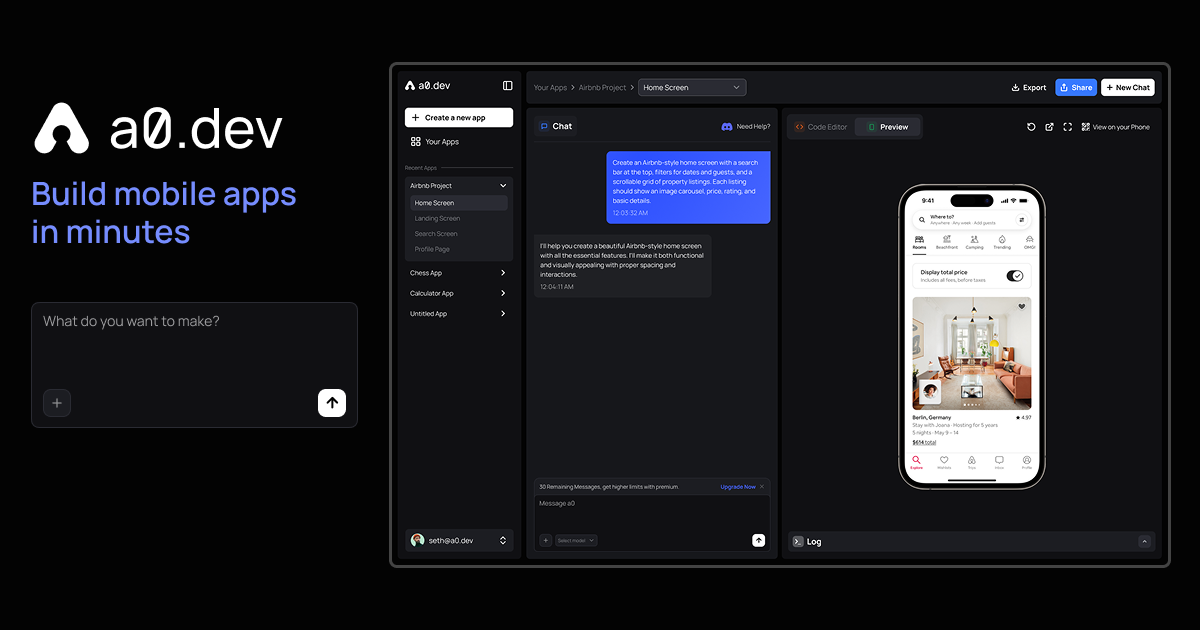
a0 is an AI platform for building iOS and Android apps through chat. It generates full React Native code, handles navigation, and manages state automatically.
The tool aims to replace the weeks of manual setup usually required for mobile development. It was built by Y Combinator alumni who wanted to make mobile dev as fast as building a website.
⚙️ How We Tested a0
We used the free plan for 7 days. We tasked the AI with building a sliding puzzle game, connecting a subscription paywall, and generating a production build for the App Store.
✨ Key Features (What Actually Stood Out)
The platform handles the entire mobile stack from UI to deployment. If you’re looking for more ways to build without a dev team, check out our coding section.
- Agent Mode – This feature allows the AI to think through multi-step logic. It successfully connected our game timer to the high-score database without errors.
- One-click publishing – This handles the Apple provisioning process. It removes the need to manually manage certificates in App Store Connect.
- Built-in Monetization – You can set up subscriptions in the chat. We added a monthly pro tier to our test app in under two minutes.
- Live Preview – The companion mobile app lets you see changes instantly. You don’t have to wait for a full build to test on a real device.
- Component Generator – It creates specific UI elements like buttons or cards. You can export these as clean React Native code for other projects.
💰 a0 Pricing — Is It Worth It?
Pricing isn’t fully transparent on their landing page. This makes it a strong choice for those exploring nocode solutions for mobile before committing to a budget.
| Plan | Price | Best For | Watch Out For |
| Free Plan | $0 | Prototyping | Limited builds |
| Pro Plan | Contact sales | Scaling apps | Hidden costs |
Our pick: Free Plan – It’s the best way to see if the AI understands your specific app logic before paying for a build.
🧪 What We Found During Testing
The AI handled the navigation logic without us writing a single line of React Native. We asked it to add a timer to our puzzle game and it updated the state management correctly on the first try.
The biggest surprise was the mobile app that lets you preview the build on your actual phone. It felt much faster than using traditional simulators or waiting for TestFlight emails.
A founder in our community who runs a fitness app told us they moved their entire front-end development to a0 because they couldn’t find a reliable React Native developer.
⚠️ Limitations We Found
- Animation control – As of February 2025, the AI struggles with complex physics for games.
- Platform lock-in – The platform is locked into React Native so you can’t export to Swift or Kotlin.
- Pricing transparency – Details are not public which makes it hard to budget for scaling.
⚔️ a0 vs Competitors
Most AI builders focus on web, but a0 is built specifically for the mobile app stores.
| Competitor | Pick it instead of a0 if… |
| v0 | You only need to build web interfaces and components. |
| FlutterFlow | You want a visual drag-and-drop editor with more manual control. |
| Cursor | You are a developer who wants to write and manage the code yourself. |
👍 Pros & Cons
| ✅ Pros | ❌ Cons |
| No Xcode required for builds | Limited animation control |
| One-click publishing to stores | No native Swift export |
| Built-in monetization features | Hidden pricing tiers |
| Live mobile preview app | Early stage bugs |
🎯 Who Should Use a0 (And Who Shouldn’t)
✅ Use it if you:
- Want to launch a mobile MVP quickly without a developer.
- Don’t own a Mac but need to build for the iOS App Store.
- Need a simple subscription-based app for your business.
❌ Skip it if you:
- Need high-performance 3D graphics for a complex game.
- Want full control over native Swift code and should use Cursor.
- Are building a web-only dashboard and should use v0.
🔐 Data & Privacy
The tool handles your App Store Connect credentials to manage deployments. You should review their privacy policy regarding how they store your API keys and project data during the build process.
🛠️ Setup & Onboarding
Setup is fast because you don’t need to install Xcode or Android Studio. You just sign in and start chatting with the agent to build your first screen immediately.
❓ Frequently Asked Questions
Does a0.dev require a Mac?
No, it builds your app in the cloud so you can develop for iOS from any computer.
Can I export the code from a0.dev?
Yes, it generates standard React Native code that you can take to any other editor.
How much does a0.dev cost?
It offers a free tier for building and testing, but you’ll need to check their latest pricing for publishing to stores.
Does a0.dev handle App Store reviews?
It uploads the build for you, but you still need to manage the final submission and review process with Apple.
Is a0.dev better than v0.dev?
a0 is built specifically for native mobile apps, while v0 is designed for web interfaces and components.
Can I add Stripe to a0 apps?
Yes, the platform has built-in monetization features to handle payments and subscriptions.
Looking for more tools like this? See all coding tools we’ve reviewed →
Discover more from AI Founder Kit
Subscribe to get the latest posts sent to your email.